Listening to bluetooth® audio
When a bluetooth® device cannot be connected, check the connection status on the “bluetooth* audio” screen. If the device is not connected, either register or reconnect the device.
*: Bluetooth is a registered trademark of bluetooth sig, inc.
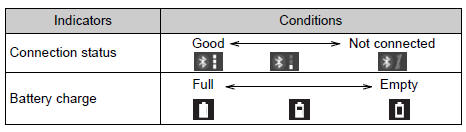
Status displayYou can check such indicators as signal strength and battery charge on the screen.
- Connection status
- Battery charge
The battery charge indicator may not be displayed depending on the connected device.
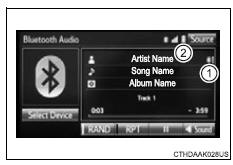
Playing bluetooth® audio
Select to play/pause.
For details on “bluetooth* audio” screen operation methods, refer to basic audio operations.
For details on how to select a track or album, refer to selecting, fastforwarding and reversing tracks/files/songs.
*: Bluetooth is a registered trademark of bluetooth sig, inc.
Test yourself
A quick Toyota RAV4 quiz: every answer comes with an explanation and a link to the manual page.