Interior features
Display settings
In this manual: Interior features
7steps
~42min
2/5difficulty
Done 0 of 7
Settings are available for adjusting the contrast and brightness of the screen. Screen for display settings

- Press the “setup” button.
- Select “display” on the “setup” screen.
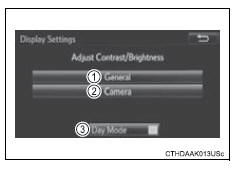
- Adjust the screen display
- Adjust the camera display*
- Changes to day mode.
*: If equipped
Day modeWhen the headlights are turned on, the screen dims.
However, the screen can be switched to day mode by selecting “day mode”.
The screen will stay in day mode when the headlights are turned on until “day mode” is selected again.
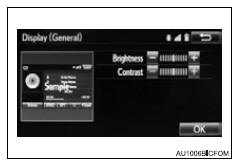
Brightness, contrast, tone and color adjustment- Select “general” or “camera” on the “display settings” screen.
- Select the desired item.
Test yourself
A quick Toyota RAV4 quiz: every answer comes with an explanation and a link to the manual page.
Was this page helpful?