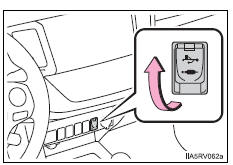
Connect an ipod, usb memory device or portable audio player to the usb/aux port as indicated below. Select “ipod”, “usb” or “aux” on the audio source selection screen and the device can be operated via audio system.Connecting using the usb/aux portIpod
Open the cover and connect an ipod using an ipod cable.
Turn on the power of the ipod if it is not turned on.
Usb memory
Open the cover and connect the usb memory device.
Turn on the power of the usb memory device if it is not turned on.
Portable audio player
Open the cover and connect the portable audio player.
Turn on the power of the portable audio player if it is not turned on.
CautionWhile driving
Do not connect a device or operate the device controls.
?
Test yourself
A quick Toyota RAV4 quiz: every answer comes with an explanation and a link to the manual page.