Making a call
- Display the phone screen.
- Select the “dial pad” tab and enter a phone number.
To delete the input phone number, select  .
For the first digit, you can enter 
by selecting  for a while.
- Press the
 switch on the
steering wheel or select .
You can dial a number from the contact data imported from your cellular phone. The system has one contact for each registered phone. Up to 2500 contacts may be stored in each contact.
- Display the phone screen.
- Select “contacts” tab.
- Choose the desired contact to call from the list.
- Choose the number and then press the
 switch on the steering
wheel or select
.
You can transfer the phone numbers in a bluetooth® phone to the system.
Operation methods differ between pbap (phone book access profile) compatible and pbap incompatible bluetooth® phones. If the cellular phone does not support either pbap or opp (object push profile) service, you cannot transfer contacts.
For pbap compatible bluetooth® phonesWhen “automatic contact/history transfer” is set to off
- Select the desired item.
- Select to transfer new contacts from a cellular phone, select “always” and then enable “automatic contact/ history transfer”.
- Select to transfer all the contacts from a connected cellular phone only once.
- Select to cancel transferring.

For pbap incompatible but opp compatible bluetooth® phones
- Select the desired item.
- Select to transfer the contacts from the connected cellular phone.
- Select to add a new contact manually.
- Select to cancel transferring.
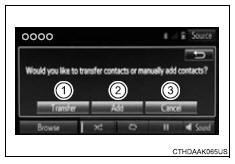
When “transfer” is selected
- Follow the steps in “update contacts from phone” from 2.
When “add” is selected
- Follow the steps in “registering a new contact to the contacts list” from 2 .
You can make a call using numbers registered in the contact.
- Display the phone screen.
- Select “favorites” tab.
- Select the desired number to make a call.
You can make a call using the call history, which has the 3 functions below.
 Calls which you missed
 Calls which you received
 Calls which you made
- Display the phone screen.
- Select “call history” tab.
- Select
 or the desired entry
from the list.
When  is selected
- Check that the “call” screen is displayed.
When the desired contact is selected
- Select the desired number.
- Check that the “call” screen is displayed.
- If you make a call to or receive a call from a number registered in the contact, the name is displayed in the call history.
- If you make multiple calls to the same number, only the last call made is displayed in the call history.
You may not be able to make international calls, depending on the mobile phone in use.
Test yourself
A quick Toyota RAV4 quiz: every answer comes with an explanation and a link to the manual page.