Interior features
Bluetooth® phone message function
In this manual: Interior features
25steps
~150min
4/5difficulty
Done 0 of 25
Received messages can be forwarded from the connected bluetooth® phone, enabling checking and replying using the audio system.
Depending on the type of bluetooth® phone connected, received messages may not be transferred to the message inbox.
If the phone does not support the message function, this function cannot be used. Displaying “message inbox” screen- Press the
 button.
- Select
 .
When an e-mail/sms/mms is received, the incoming message screen pops up with sound and is ready to be operated on the screen.
- Select to check the message.
- Select to refuse the message.
- Select to call the message sender.
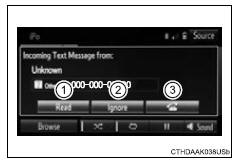
Receiving a message
- Depending on the cellular phone used for receiving messages, or its registration status with the navigation system, some information may not be displayed.
- The pop up screen is separately available for incoming e-mail and sms/ mms messages under the following conditions:
E-mail:
- “Incoming e-mail display” is set to “full screen”.
- “E-mail notification popup” is set to on
Sms/mms:
- “Incoming sms/mms display” is set to “full screen”.
- “Sms/mms notification popup” is set to on.
- Display the “message inbox” screen.
- Select the desired message from the list.
- Check that the message is displayed.
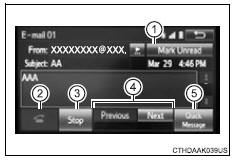
- E-mails: select “mark unread” or “mark read” to mark mail unread or read on the message inbox screen.
- Depending on the type of bluetooth® phone being connected, it may be necessary to perform additional steps on the phone.
- Messages are displayed in the appropriate connected bluetooth® phone’s registered mail address folder.
- Display the “message inbox” screen.
- Select the desired message from the list.
- Select “quick message”.
- Select the desired message.
- Select “send”.
If an error message is displayed, follow the guidance on the screen to try again.
Editing quick reply message- Select “quick message”.
- Select
 corresponding to the
desired message to edit. - Select “ok” when editing is completed.
Calls can be made to an e-mail/sms/mms message sender’s phone number.
- Display the “message inbox” screen.
- Select the desired message.
- Select
 .
- Check that the “call” screen is displayed.
Calls can be made to a number identified in a message’s text area.
This operation cannot be performed while driving.
- Display the “message inbox” screen.
- Select the desired message.
- Select the text area.
- Select
 corresponding to the
desired number. - Check that the “call” screen is displayed.
Test yourself
A quick Toyota RAV4 quiz: every answer comes with an explanation and a link to the manual page.
Was this page helpful?