Interior features
Audio settings
In this manual: Interior features
7steps
~42min
2/5difficulty
Done 0 of 7
Settings are available for adjusting the radio operation, cover art, etc. Screen for audio settings
- Press the “setup” button.
- Select “audio” on the “setup” screen.
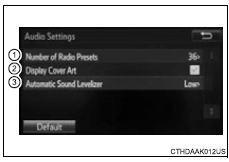
- Number of radio presets select the number of radio preset stations.
- Display cover art on/off
- Automatic sound levelizer
- Select “automatic sound levelizer”.
- Select “high”, “mid”, “low” or “off”.
The treble, mid and bass levels can be adjusted for each audio mode separately.
About automatic sound leveliser (asl)Asl automatically adjusts the volume and tone quality according to the vehicle speed.
Test yourself
A quick Toyota RAV4 quiz: every answer comes with an explanation and a link to the manual page.
Was this page helpful?