2Az-fe engine mechanical
Checking monitor status
In this manual: 2Az-fe engine mechanical
12steps
~72min
3/5difficulty
Done 0 of 12
- Perform monitor drive pattern
- Connect the intelligent tester to the dlc3.
- Turn the ignition switch and the tester on.
- Clear the dtcs (see page es-35).
- Run the vehicle in accordance with the applicable drive pattern described in readiness monitor drive pattern (see page es-19). Do not turn the ignition switch off.
The test results will be lost if the ignition switch is turned off.
- Access monitor result
- Select the following items from the intelligent tester menus: diagnosis, enhanced obd ii, monitor info and monitor result. The monitor status appears after the component name.
- Incmp: the component has not been monitored yet.
- Pass: the component is functioning normally.
- Fail: the component is malfunctioning.
- Confirm that the component is either pass or fail.
- Select the component and press enter. The accuracy test value appears if the monitor status is either pass or fail.
- Check component status
- Compare the test value with the minimum test limit (min limit) and maximum test limit (max limit).
- If the test value is between the minimum and maximum test limits, the component is functioning normally. If not, the component is malfunctioning.
The monitor result might on rare occasions be pass even if the malfunction indicator lamp (mil) is illuminated. This indicates the system malfunctioned on a previous driving cycle. This might be caused by an intermittent problem.
- Monitor result information
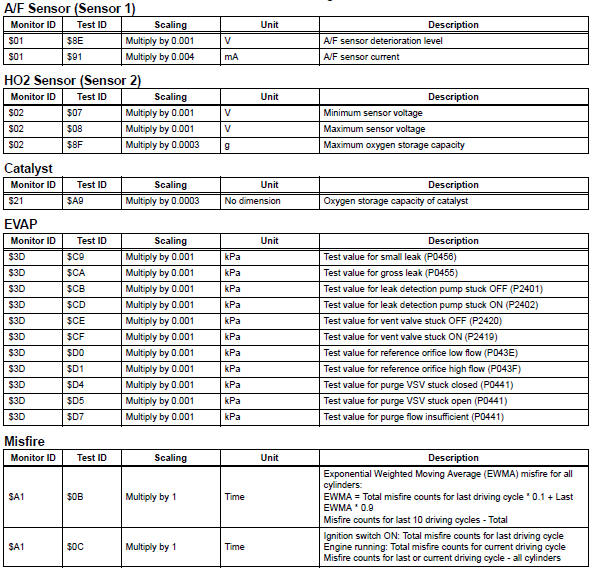
If you use a generic scan tool, multiply the test value by the scaling value listed below.

Test yourself
A quick Toyota RAV4 quiz: every answer comes with an explanation and a link to the manual page.
Was this page helpful?