Managing the phone book
When a phone is connected with Bluetooth to the vehicle, contacts can be managed directly in the center display.
Up to 3000 contacts can be displayed from the phone selected in the center display.
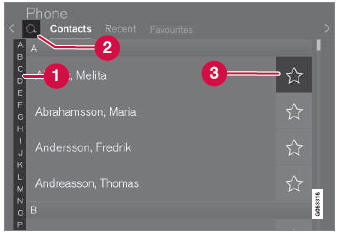
 Scroll by letter or
 to find contacts. Only letters matching existing contacts in the phone book will be shown.
 Search contacts - tap
 to search by phone number or name in the phone book.
 Favorites - tap
 to add/remove a contact from the list of favorites.
Sorting
The phone book is sorted in alphabetical order and special characters and numbers are sorted under  . The list can be sorted by either first name or last name. This is adjusted in your cellular phone settings.
Test yourself
A quick Volvo XC90 quiz: every answer comes with an explanation and a link to the manual page.