Phone
A phone equipped with Bluetooth can be wirelessly connected to the vehicle's integrated hands-free system.
The audio and media system offers hands-free functionality for remotely controlling a number of the phone's features. The phone's integrated controls can also be used, even when it is connected to the vehicle.
When the phone has been paired and connected to the vehicle, it can be used as an Internet connection or to make or receive calls, send or receive text messages or wirelessly play music.
The phone is controlled from the center display, and the App menu (accessed using the right-side steering wheel keypad) and voice commands can also be used to control certain functions.
Overview
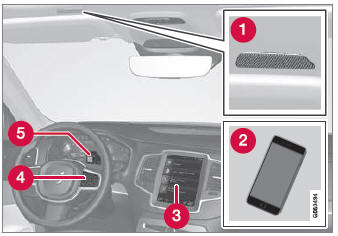
 Microphone.
 Phone.
 Phone handling in the center display.
 Keypad for controlling phone functions shown in the center display and voice commands.
 Instrument panel.
- Automatically connecting a phone to the vehicle via Bluetooth
- Connecting a phone to the vehicle via Bluetooth manually
- Disconnecting a phone connected via Bluetooth
- Switching between phones connected via Bluetooth
- Deleting devices connected via Bluetooth
- Wireless charger*
- Phone Settings
- Voice control
- Operating the App Menu on the Instrument Panel
- Sound Settings
- Connecting the vehicle to the Internet using a phone connected via Bluetooth
* Option/accessory.
Test yourself
A quick Volvo XC90 quiz: every answer comes with an explanation and a link to the manual page.