Media Player
Data Sharing for Services
In this manual: Media Player
2steps
~12min
1/5difficulty
Done 0 of 2
If you haven't activated data sharing for a connected service or for downloaded apps, you can do this when you start them in your center display. The first time that you start a service, or e.g. after a factory reset or certain software updates, you will also need to accept Volvo's terms and conditions for connected services.
Enabling data sharing at service start
- Select the function or service you want to activate.
- If this is the first time you use the service, or after a factory reset or certain software updates, you will first need to accept Volvo's terms and conditions for connected services in order to continue.
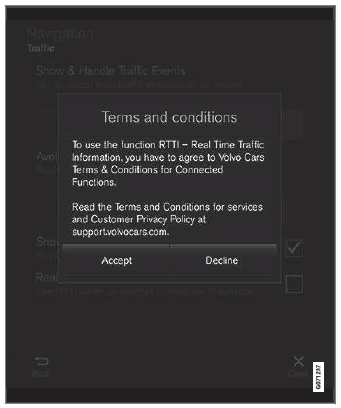
- Accept data sharing for the service or decline. If you choose to accept, data sharing will be enabled and you can begin using the service.
Enabling data sharing at app start
To accept data sharing for an app that needs the function, start the app and tap Accept in the pop-up window.
You can disable data sharing for services and apps in the settings menu under System  Privacy and data
 Data Sharing.
Test yourself
A quick Volvo XC90 quiz: every answer comes with an explanation and a link to the manual page.
Was this page helpful?