Media Player
Playing Media
In this manual: Media Player
15steps
~90min
4/5difficulty
Done 0 of 15
The media player is controlled from the center display. Several other functions can also be controlled using the right-side steering wheel keypad or by using voice commands.
The radio can also be controlled in the media player. See the section describing the radio.
Starting a Media Source
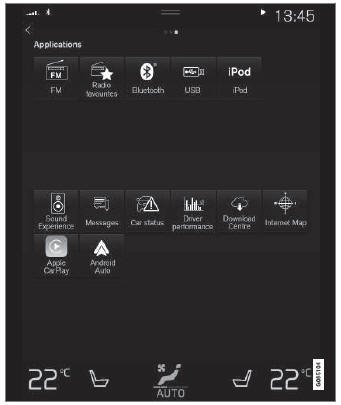
App. (Generic illustration; basic apps vary depending on market and model).
USB Flash Drive
- Insert a USB flash drive.
- Open the USB app from App view.
- Select the track you would like to play.
- Playback will start.
MP3 Player and iPod®
- Connect the media source.
- Start playback on the connected media.
- Open the app (iPod, USB) from App view.
- Playback will start.
Bluetooth Connected Device
- Activate Bluetooth on the media source.
- Connect the media source.
- Start playback on the connected media.
- Open the Bluetooth app from App view.
- Playback will start.
Internet-Connected Media
Media playback from internet-connected apps:
- Connect the vehicle to the Internet.
- Open the app from the App view.
- Playback will start.
Read the separate section on how to download apps.
Videos
- Connect the media source.
- Open the USB app from App view.
- Tap the title you would like to play.
- Playback will start.
Apple CarPlay
CarPlay is described in a separate section.
Android Auto
Android Auto is described in a separate section.
Test yourself
A quick Volvo XC90 quiz: every answer comes with an explanation and a link to the manual page.
Was this page helpful?