Impostazione dell'intervallo di tempo dal veicolo che precede
The time interval to the vehicle ahead can be set for the functions Adaptive Cruise Control*, Pilot Assist* and Distance Alert*.
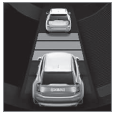 Different time intervals to the vehicle ahead can be selected and are shown in the instrument panel as 1–5 horizontal bars. The more bars, the longer the time interval. One bar represents an interval of approx. 1 second to the vehicle ahead. 5 bars represents approx. 3 seconds.
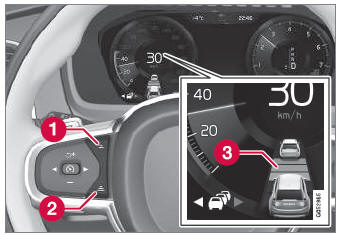
Comando per impostare l'intervallo di tempo.
 Reduce the time interval
 Increase the time interval
 Distance indicator
- Press the (1) or (2) button to decrease or increase the time interval.
- L'indicatore della distanza (3) mostra l'intervallo di tempo attuale.
In order to help your vehicle follow the vehicle ahead as smoothly and comfortably as possible, Adaptive Cruise Control allows the time interval to vary noticeably in certain situations. At low speeds, when the distance to the vehicle ahead is short, Adaptive Cruise Control increases the time interval slightly.
- The greater the vehicles' speed, the greater the distance between them for a set time interval.
- Utilizzare solo intervalli di tempo consentiti dal codice della strada locale.
- If driver support does not seem to respond with a speed increase when activated, it may be because the time interval to the vehicle ahead is shorter than the set time interval.
- Utilizzare solo un intervallo di tempo adatto alle condizioni di guida attuali.
- The driver should be aware that short time intervals give them limited time to react and act to any unforeseen traffic situation.
* Opzione/accessorio.
Mettiti alla prova
Un breve quiz sulla Volvo XC90: ogni risposta ha una spiegazione e un link alla pagina del manuale.