Displays and Controls
Operating the App Menu on the Instrument Panel
In this manual: Displays and Controls
3steps
~18min
2/5difficulty
Done 0 of 3
The App menu in the instrument panel is controlled using the right-side steering wheel keypad.
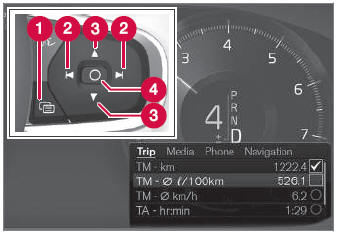
App menu and right steering wheel keypad. The illustration is generic.
 Open/close
 Left/right
 Up/down
 Confirm
Opening and Closing the App Menu
- Tap open/close (1).
- The app menu opens/closes.
The App menu turns off automatically after a period of inactivity or after certain selections are made.
Navigating and Selecting in the App Menu
- Navigate between apps by tapping left or right (2).
- Functions for the previous/next app will be shown in the App menu.
- Scroll through the functions for the selected app using the up or down arrows (3).
- Confirm or make a selection for the function by pressing confirm (4).
- The function will be activated and, for some selections, the App menu will then close.
The next time the App menu is opened, the functions for the most recently selected app will be displayed automatically.
Test yourself
A quick Volvo XC90 quiz: every answer comes with an explanation and a link to the manual page.
Was this page helpful?