Display e comandi vocali
Gestione del menu delle app sul quadro strumenti
In questo manuale: Display e comandi vocali
3passaggi
~18min
2/5difficoltà
Completati 0 di 3
The App menu in the instrument panel is controlled using the right-side steering wheel keypad.
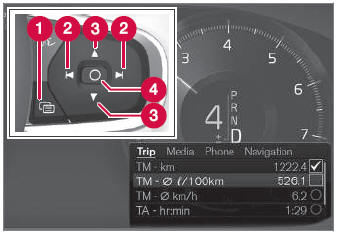
Menu delle app e pulsantiera del volante destro. L'illustrazione è di carattere generale.
 Open/close
 Left/right
 Up/down
 Confirm
Apertura e chiusura del menu delle app
- Tap open/close (1).
- Apertura/chiusura del menu delle app.
The App menu turns off automatically after a period of inactivity or after certain selections are made.
Navigazione e selezioni nel menu delle app
- Navigate between apps by tapping left or right (2).
- Le funzioni dell'app precedente/successiva saranno mostrate nel menu delle app.
- Scroll through the functions for the selected app using the up or down arrows (3).
- Confirm or make a selection for the function by pressing confirm (4).
- The function will be activated and, for some selections, the App menu will then close.
The next time the App menu is opened, the functions for the most recently selected app will be displayed automatically.
Mettiti alla prova
Un breve quiz sulla Volvo XC90: ogni risposta ha una spiegazione e un link alla pagina del manuale.
Questa pagina ti è stata utile?