Écran et commandes vocales
Utilisation du menu des applications sur le combiné d'instruments
Dans ce manuel : Écran et commandes vocales
3étapes
~18min
2/5difficulté
Fait 0 sur 3
The App menu in the instrument panel is controlled using the right-side steering wheel keypad.
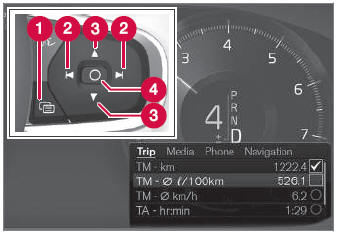
Menu des applications et commandes du volant côté droit. L'illustration est générique.
 Open/close
 Left/right
 Up/down
 Confirm
Ouverture et fermeture du menu des applications
- Tap open/close (1).
- Le menu des applications s'ouvre/se ferme.
The App menu turns off automatically after a period of inactivity or after certain selections are made.
Navigation et sélection dans le menu des applications
- Navigate between apps by tapping left or right (2).
- Les fonctions de l'application précédente/suivante sont affichées dans le menu des applications.
- Scroll through the functions for the selected app using the up or down arrows (3).
- Confirm or make a selection for the function by pressing confirm (4).
- The function will be activated and, for some selections, the App menu will then close.
The next time the App menu is opened, the functions for the most recently selected app will be displayed automatically.
Testez-vous
Un quiz rapide sur Volvo XC90 : chaque réponse est expliquée, avec un lien vers la page du manuel.
Cette page vous a-t-elle été utile ?