Дисплей и голосовой контроль
Обработка меню приложения на панели прибора
Место в руководстве: Дисплей и голосовой контроль
3шагов
~18мин
2/5сложность
Выполнено 0 из 3
The App menu in the instrument panel is controlled using the right-side steering wheel keypad.
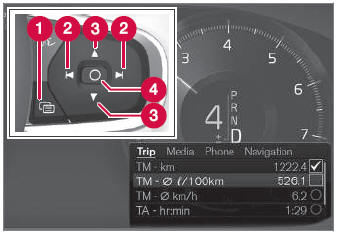
Меню приложения и клавиатура правого рулевого колеса. The illustration is generic.
 Open/close
 Left/right
 Up/down
 Confirm
Открытие и закрытие меню приложения
- Tap open/close (1).
- Приложение мужчин открывается/закрывается.
The App menu turns off automatically after a period of inactivity or after certain selections are made.
Навигация и выборы в меню приложения
- Navigate between apps by tapping left or right (2).
- Функции для предыдущего/следующего приложения будут показаны в меню приложения.
- Scroll through the functions for the selected app using the up or down arrows (3).
- Confirm or make a selection for the function by pressing confirm (4).
- The function will be activated and, for some selections, the App menu will then close.
The next time the App menu is opened, the functions for the most recently selected app will be displayed automatically.
Проверьте себя
Короткий тест по Volvo XC90: после ответа — пояснение и ссылка на страницу руководства.
Страница помогла?