Pantalla y control por voz
Manejo del menú de aplicaciones en el cuadro de instrumentos
En este manual: Pantalla y control por voz
3pasos
~18min
2/5dificultad
Hecho 0 de 3
The App menu in the instrument panel is controlled using the right-side steering wheel keypad.
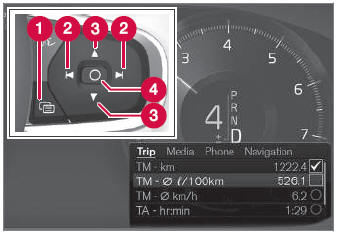
Menú de aplicaciones y botonera del volante derecho. La ilustración es genérica.
 Open/close
 Left/right
 Up/down
 Confirm
Apertura y cierre del menú de aplicaciones
- Tap open/close (1).
- La aplicación se abre/cierra.
The App menu turns off automatically after a period of inactivity or after certain selections are made.
Navegación y selecciones en el menú de aplicaciones
- Navigate between apps by tapping left or right (2).
- Las funciones de la aplicación anterior/siguiente se mostrarán en el menú de aplicaciones.
- Scroll through the functions for the selected app using the up or down arrows (3).
- Confirm or make a selection for the function by pressing confirm (4).
- The function will be activated and, for some selections, the App menu will then close.
The next time the App menu is opened, the functions for the most recently selected app will be displayed automatically.
Pon a prueba tus conocimientos
Un test rápido sobre el Volvo XC90: cada respuesta trae una explicación y un enlace a la página del manual.
¿Le resultó útil esta página?