Electric windows switch
Applies to vehicles: with power windows
Controls
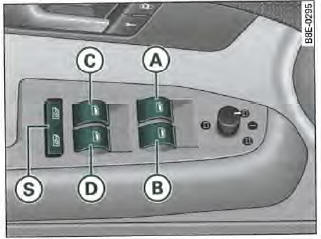
Fig. 57 Partial view of driver's door: controls.
Front window controls
- (A) Control => fig. 57 for driver's window.
- (B) Control for front passenger window
Rear window controls*
- (C) Control for rear left window
- (D) Control for rear right window
(S) Safety switch
CAUTION!
- If you leave the vehicle, even briefly, always remove the ignition key, especially if children are in the vehicle. They could start the engine or operate electrical equipment (such as the power windows). Risk of accident! The power windows are only deactivated after the driver's or front passenger's door has been opened.
- Stay alert and watch closely when closing the windows! This can cause crushing injuries!
- If you lock the vehicle from the outside, no one must be inside the vehicle, as it would be impossible to open the windows in an emergency.
Applies to vehicles: with power windows
Switch in driver's door
The driver can operate all power windows in the vehicle.
The window controls have a two-stage function:
Opening the window
- Press the control to the first stage and hold it there until the window has reached the desired position.
- Briefly press the control to the second stage to open the window automatically.
Closing the window
- Pull the control to the first stage and hold it until the window has reached the desired position.
- Briefly pull the control to the second stage to close the window automatically.
Safety switch
With the safety switch =>, fig. 57 (S), you can deactivate the window controls on the rear doors. The rear windows can only be opened or closed from the rear seats if the switch is pressed in.
The symbol The indicator lights up in the
safety switch when the rear window controls are deactivated (switch not pressed in).
Note
The windows can be opened and closed for up to 10 minutes after the ignition is switched off. However, opening the driver's or front passenger's door deactivates the power windows.
Applies to vehicles: with power windows
Control on front passenger door and rear doors
A window control is located on these doors.
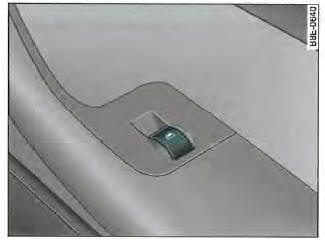
Fig. 58 Location of control on front passenger door
The window controls have a two-stage function:
Opening the window
- Press the control to the first stage and hold it there until the window has reached the desired position.
- Briefly press the control to the second stage to open the window automatically.
Closing the window
- Pull the control to the first stage and hold it until the window has reached the desired position.
- Briefly pull the control to the second stage to close the window automatically.
Note
The windows can be opened and closed for up to 10 minutes after the ignition is switched off. However, opening either front door deactivates the power windows.
Opening and closing windows via central locking system
When unlocking and locking the vehicle, the windows can be opened or closed.
Opening windows with remote control
- Press the open button

until the windows have reached the desired position.
Opening windows with key
- Hold the key in the open position in the driver's door lock until all windows are open.
Closing windows with remote control
- Press the close button
 until all windows
are closed
Closing windows with key
- Hold the key in the close position in the driver's door lock until all windows are closed.
To interrupt the opening or closing process, release the corresponding button on the remote control or turn the key in the door lock back to its initial position.
CAUTION!
- Never close the windows without supervision or in an uncontrolled manner. Risk of injury!
- For safety reasons, only close and open your vehicle's windows when you are within approximately
WARNING! (continued)
2 metres of the vehicle. While pressing the close button, always watch the windows to prevent anyone from being injured. The closing process stops immediately when you release the button.
Applies to vehicles: with power windows
Malfunctions
Automatic opening and closing function not working
If the battery has been disconnected and reconnected, the automatic opening/closing function will not work and must be reset as follows:
- Raise the window until it reaches the stop while holding the window control up.
- Release the control, then raise it again for one second. The automatic opening/closing function is now reactivated.
Test yourself
A quick Audi A4 quiz: every answer comes with an explanation and a link to the manual page.