Multitronic®
Introduction
Your vehicle is equipped with a continuously variable transmission (multitronic®), electronically controlled. Compared with a conventional automatic transmission, the transmission ratio does not change in steps through gear shifts but continuously. This contributes to greater transmission comfort and economical driving.
The selection of the appropriate gear ratio (upshifts and downshifts) takes place fully automatically, based on predefined driving programs => "Dynamic Regulating Program (DRP)".
The transmission also features the Tiptronic system. This allows the driver to select gears manually if desired => .
Unlike conventional automatic transmissions, power is transmitted in your multitronic® vehicle not through a torque converter but through a multi-plate clutch. For this reason, the vehicle has less tendency to creep forward at idle when you stop, for example at a traffic light, with the selector lever in position D, S or R.
Notes on driving with multitronic®
The transmission ratio changes continuously.
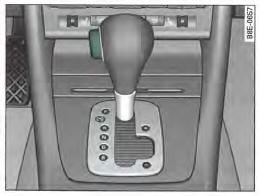
Fig. 156 Partial view of centre console: selector lever with lock button
Starting
- Press and hold the brake pedal.
- Hold the lock button (on the selector lever knob) down, move the selector lever to the desired position, e.g. D, then release the lock button.
- Wait a moment until the gearbox has shifted into the new gear (a slight jolt can be felt).
- Release the brake pedal and accelerate
Temporary stop
- Press the brake pedal until the vehicle comes to a stop.
- Keep the brake pedal pressed (e.g. when stopped at a traffic light) so that the vehicle cannot move forward or backward while the engine is idling.
- Do not accelerate.
- When starting on an incline, apply the handbrake to prevent the vehicle from moving uncontrollably
Parking
- Press the brake pedal and keep it depressed
- Apply the parking brake fully.
- Keep the release button pressed, move the selector lever to position P and release the release button.
Your vehicle is equipped with a hill start assist that makes starting on an incline easier. Keep the brake pedal pressed for a few seconds to activate the system. After you release the brake pedal, braking force is maintained for a moment to prevent the vehicle from rolling backward when starting off.
The engine can only be started when the selector lever is in position P or N w .
To park on level ground, simply move the selector lever to position P. If the road is sloping, first apply the parking brake fully, then move the selector lever to position P. This avoids placing excessive load on the locking mechanism and makes it easier to release the selector lever from position P.
CAUTION!
- Do not accelerate when changing the selector lever position while the vehicle is stationary and the engine is running - risk of accident!
- When the vehicle is temporarily stopped, for example at a traffic light, and the selector lever is in position D, S or R, the power transmission is not fully disconnected. When stopped, you must therefore depress the brake pedal and, when starting off, if necessary apply the handbrake to prevent the vehicle from moving uncontrollably - risk of accident!
- Never engage position R or P with the selector lever while driving - risk of accident!
Selector lever positions
This section describes all selector lever positions.
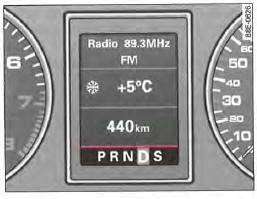
Fig. 157 Display: selector lever positions
The current selector lever position is shown in the instrument cluster display by highlighting the corresponding symbol.
P - Parking
In this position, the drive wheels are mechanically locked.
Engage the parking lock only when the vehicle is stationary.
To engage position P and to release it from this position, press the release button (located on the selector lever knob) and press the brake pedal at the same time.
R - Reverse
When you engage reverse, the transmission automatically selects the lowest gear ratio.
Only engage reverse when the vehicle is stationary and the engine is idling. To move the selector lever into position R, you must press the lock button and the brake pedal at the same time.
When the selector lever is in position R and the ignition is switched on, the reversing lights come on.
N - Neutral
In this position, the gearbox is in neutral.
D - Drive (permanent forward driving position)
In this position, the transmission automatically selects the optimal gear ratio. This depends on engine load, vehicle speed and the dynamic regulating program.
To shift from N to D, press the brake pedal when the vehicle speed is below 5 km/h or when the vehicle is stationary.
In certain operating conditions (e.g. when driving in mountains or towing a trailer), it can be very advantageous to temporarily use the Tiptronic system => to adjust the gear ratio manually to the driving conditions.
S - Sport position
For sporty driving, select position S. The engine's power reserves are fully utilised. When accelerating, gear changes are noticeable.
To move from position N to S, press the brake pedal when the vehicle speed is below 5 km/h or when the vehicle is stationary => see "Selector lever positions" in the chapter,
CAUTION!
- Never engage position R or P with the selector lever while driving - risk of accident!
- When the engine is running and the selector lever is in position D or S, the vehicle must be held with the foot brake, because even when the engine is idling, the power transmission is not completely disconnected - the car "creeps forward". If a gear is engaged while the vehicle is stationary, do not accelerate uncontrollably (e.g. by hand from the engine compartment). The vehicle would move off immediately - in some cases even if the handbrake is fully applied - risk of accident!
- Before opening the engine hood or having another person open it and working on the running engine, move the selector lever to position P and apply the parking brake fully - risk of accident! Observe the warnings in "Work in the engine compartment" without exception.
Note
- If you accidentally move the selector lever to N while driving, take your foot off the accelerator and wait until the engine is idling before shifting back to D or S.
- For reasons of fuel consumption and environmental protection, the gearbox in certain vehicle models is designed so that the maximum speed can only be reached in position S.
Selector lever lock
The selector lever lock prevents a gear from being engaged accidentally and the vehicle from moving off uncontrolled.
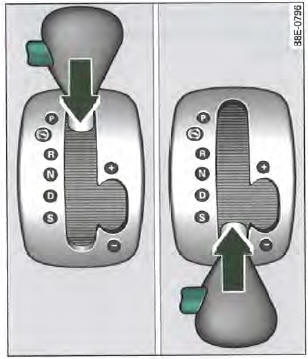
Fig. 158 Selector lever lock
To deactivate the selector lever lock, proceed as follows:
- Switch on the ignition.
- Press the brake pedal and keep the release button pressed at the same time.
Automatic selector lever lock
The selector lever is locked in positions P and N when the ignition is switched on. To release it, the driver must press the brake pedal. As a reminder to the driver, the following message appears in the instrument cluster display when the selector lever is in position P or N: To select a gear when stationary, depress the brake pedal. In addition, the
automatic selector lever lock symbol lights up on the shift gate.
The selector lever lock only works when the vehicle is stationary or travelling at a speed below 5 km/h.
When the vehicle exceeds this speed, the lock is automatically deactivated in position N.
The selector lever is not locked during a brief change of position, e.g. from R to D via position N. This allows you to free the vehicle if it is “stuck”, for example.If the lever remains in position N for more than one second and you do not press the brake pedal, the selector lever lock engages.
Lock button
The lock button on the selector lever knob prevents the selector lever from being engaged accidentally in certain positions.
Press the release button to deactivate the selector lever lock. In the illustration, the positions for which you must press the release button are shown in color => Fig. 158.
Ignition key lock
Once the ignition has been switched off, the ignition key can only be removed when the selector lever is in position P. While the ignition key is removed, the selector lever is locked in position P.
Kick-down function
The kick-down function provides maximum acceleration.
If you press the accelerator pedal fully, beyond the pressure point, the transmission selects a lower gear ratio depending on vehicle speed and engine speed. As long as you keep the accelerator pedal pressed, the engine speed is automatically regulated to achieve maximum vehicle acceleration.
CAUTION!
Note that on icy or slippery roads, the driven wheels may spin when you operate the kick-down function - risk of skidding!
Dynamic Regulation Program (DRP)
The multitronic® transmission is controlled electronically.
The transmission of your vehicle is controlled electronically.
Gear selection takes place automatically according to the preset driving programs.
When you are driving at a moderate speed, the transmission selects the most economical driving program. As the transmission shifts up very early and downshifts very late, it allows you to drive with fuel-efficient consumption.
When driving more sportily with abrupt accelerator pedal movements, strong acceleration, frequent speed changes, when driving at maximum speed or
when kickdown is activated, the transmission selects the sport driving program.
Selection of the most advantageous driving program is a continuous process. It is also possible to select a sportier driving program by quickly pressing the accelerator pedal. The transmission then shifts down to a gear corresponding to the vehicle speed and allowing rapid acceleration (e.g. when overtaking another vehicle), without the need to press the accelerator pedal to the kickdown position. After shifting up, the transmission returns to the original driving program if the driver's driving style corresponds to it.
When driving in mountains, the gear ratio is continuously adapted to the gradient. On downhill sections, when you press the brake pedal, the transmission downshifts automatically. Engine braking is thus more effective.
If the cruise control* is activated while driving in mountains, the transmission automatically selects a lower gear ratio so that the set speed can be maintained. This, however, results in an increase in engine speed.
Tiptronic mode
Tiptronic allows the driver to manually select 7 preprogrammed gear ratios (speed ranges).
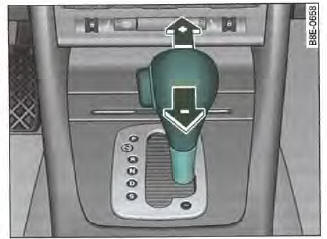
Fig. 159 Center console: manual gear selection (Tiptronic)
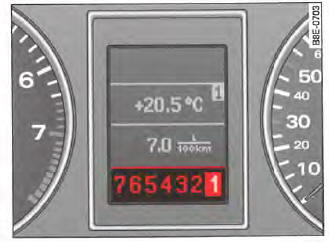
Fig. 160 Display: manual gear selection (Tiptronic)
Switching to manual mode
- In position D, push the selector lever to the right.
As soon as the transmission has changed mode, the numbers 7 6 5 4 3 2 1 appear in the display and the selected gear is highlighted.
Upshifting
Lightly push the selector lever (in Tiptronic position) forward => Fig. 159
Downshifting
Push the selector lever (in Tiptronic position) slightly backwards.
The Tiptronic system allows the driver to manually select 7 preprogrammed gear ratios (speed ranges). Switching from D to manual mode can take place when the vehicle is stationary or while driving.
When accelerating, the transmission automatically upshifts from gears 1, 2, 3, 4, 5 and 6 to the next higher gear shortly before the maximum permitted engine speed is reached.
If you have selected a lower gear than the one shown in the instrument cluster display => Fig. 160, the automatic function only downshifts when the engine can no longer overrev.
When the vehicle downshifts (for example when braking), the transmission shifts to the next lower gear as soon as the minimum engine speed for the current gear is reached.
On downhill sections, engine braking is more effective when a lower gear is selected.
When the kickdown function is activated, the transmission downshifts depending on vehicle speed and engine speed.
Emergency programme
In the event of a system fault, the transmission switches to the emergency programme.
In the event of a malfunction, the automatic function switches to emergency operating mode. All segments then light up in the display field.
Inverted display
If the display is inverted, you can continue driving.
However, have the multitronic® transmission checked as soon as possible.
Flashing display
If the display flashes, a serious malfunction has been detected. Drive carefully to the nearest workshop and have the fault rectified.
Steering wheel with Tiptronic
The buttons on the steering wheel allow the driver to manually select seven preprogrammed gear ratios (speed ranges).
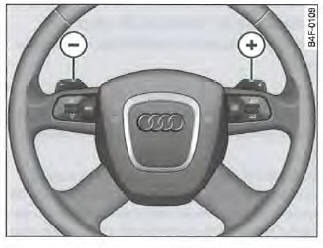
Fig. 161 Steering wheel: Tiptronic control buttons
- Press the left toggle switch to downshift

- Press the right toggle switch to upshift

The controls are activated when the selector lever is in position D, S or in manual gear selection mode (Tiptronic).
Of course, you can continue to use manual shift mode via the selector lever on the centre console.
Test yourself
A quick Audi A4 quiz: every answer comes with an explanation and a link to the manual page.