Cruise control
Introduction
The cruise control allows you to drive at a constant speed.
The cruise control maintains any desired speed constant from approximately 30 km/h. This is of course only possible as long as the engine power and engine braking allow it. The driver can thus "take the foot off the accelerator pedal", especially over long distances.
The fo indicator lamp lights up in the instrument cluster when the cruise control is in control mode.
CAUTION!
For safety reasons, do not use cruise control in heavy traffic or on slippery roads (ice, risk of aquaplaning, loose gravel) - risk of accident!
 Warning!
On vehicles with a manual transmission: If you shift into neutral while cruise control is active, always press the clutch pedal fully down! Otherwise, the engine may overrev and could be damaged.
Note
On a steep downhill slope, cruise control cannot keep the vehicle speed constant. The vehicle accelerates under its own weight. Therefore, downshift in time or brake with the foot brake.
Storing the speed
The desired speed must be stored.
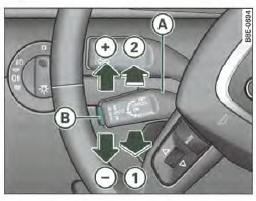
Fig. 148 Cruise control controls
- Drive at the desired speed.
- Pull lever (A) to position => fig. 148 (1) to switch the system on.
- Briefly press button (B).
The current speed is stored and held constant as soon as you release button (B).
Changing the stored speed
The desired speed can be changed.
Increasing speed
- Push lever (A) upward, in the direction => fig. 148

- Release the lever to store the current speed.
Reducing speed
Push lever (A) downward, in the direction => , fig. 148
Release the lever to store the current speed.
You can also increase your speed by pressing the accelerator pedal. When you release the accelerator pedal, the vehicle returns to the previously set speed.
However, if you exceed the set speed by more than 10 km/h for more than 5 minutes, the set speed is cleared. You must then set the speed again.
Brief actuation of lever (A)
Each time you briefly push lever (A) upward, in the direction => , fig. 148 , the speed increases by
approximately 2 km/h.
Each time you briefly push lever (A) downward, in the direction => , fig. 148 , the speed decreases by
approximately 2 km/h.
Temporarily deactivating cruise control
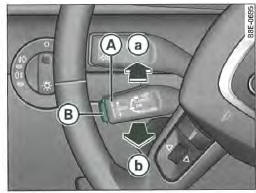
Fig. 149 Cruise control controls
- Press the brake pedal or
- Press the clutch pedal (if fitted) or
- Push lever (A) => fig. 149 to position (a) (without letting it engage).
When the system is temporarily deactivated, the set speed remains stored.
To resume the previously set speed, release the clutch or brake pedal and pull control (A) back to position.
If no speed was set when the system was temporarily switched off, you can store a new desired speed as follows: drive at the desired speed, then briefly press => fig. 148 (B) (SET).
CAUTION!
The stored speed can only be resumed if it is not too high for the current traffic conditions - risk of accident!
Switching off cruise control
While driving
- Push lever (A) => , fig. 148 to position (2) (until it engages).
With the vehicle stationary
- Switch off the ignition.
Test yourself
A quick Audi A4 quiz: every answer comes with an explanation and a link to the manual page.