Multimedia Manual
Functions when guidance to destination is inactive
In this manual: Multimedia Manual
~1min read
Unlike the display when guidance to destination is active, the following options are available when guidance to destination is deactivated:
Starting navigation
Press the NAV button, then select Start navigation.
The Enter address menu appears, see description.
Current position information
The following information about the current position is shown on the display:
Locality
Street
Longitude
Latitude
Map section
Destination information
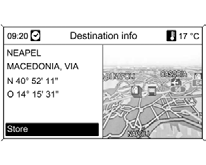
The following information about the destination is shown on the display:
Locality
Street
Longitude
Latitude
Map section
Test yourself
A quick Chevrolet Cruze quiz: every answer comes with an explanation and a link to the manual page.
Was this page helpful?