TMC messages (traffic news)
The driver can receive information about the current traffic situation both on the route and on all sections, when TMC traffic information is received.
TMC traffic information is shown on the guidance screen as symbols or, in the TMC messages menu, as detailed message text.
The received traffic information is used for dynamic destination guidance. The route is selected to avoid traffic obstructions according to previously set criteria.

Using TMC traffic information requires reception of TMC-enabled radio stations in the region.
Dynamic destination guidance works only when traffic information is received by the TMC traffic information system.
Displaying detailed traffic information as text message
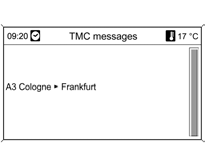
Press the NAV button, then select TMC messages.
A list of all received TMC traffic status messages is displayed.
Depending on the set filter criteria, either all traffic status messages or only those relevant to the route are displayed.
Detailed information is displayed after confirming a traffic status message.
To exit, press the BACK button.
Test yourself
A quick Chevrolet Cruze quiz: every answer comes with an explanation and a link to the manual page.