TMC settings
Infotypes
Select whether traffic information will be shown on the map when Guidance to destination mode is switched on and, if so, which type.
When the User defined option is used, only information of the selected types is displayed.
Highlight and confirm the selection with the MENU knob.
Filtering
Select whether to display only Traffic messages along route or All traffic messages on the map as symbols and in the TMC messages menu as detailed text.
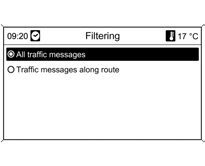
Highlight and confirm the selection with the MENU knob.
Sort criteria
Select whether traffic messages are listed by distance or by street name.
Highlight and confirm the selection with the MENU knob.
Deleting Lists

When Address book or Last destination list is selected and confirmed, the corresponding entries are deleted.
Adding/Deleting Map Data
Insert the navigation DVD
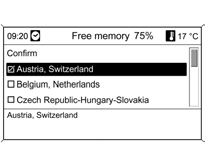
Map data can be loaded from the DVD into the internal memory of the infotainment system using the Map data add / remove menu.
Maps to be saved to memory are selected and marked using the MENU knob.
Remove the selection from maps to be deleted from memory.
Delete or save the maps by selecting Confirm.
The copying process takes a certain amount of time, which depends on the amount of data.
The free memory space is shown in the top line.
Route guidance cannot be used while maps are being added or deleted.
The indicated copying time is approximate and does not account for other functions running at the same time, for example, playback of MP3 files.
If the copying process is interrupted because the system is switched off, the process must be restarted manually after switching the system on.
If the copying process is cancelled manually, all map data copied up to that point is deleted from memory. This process takes some time.
Quick Deletion of All Navigation Data
If navigation using data from the internal memory is not possible, or an error message is displayed during map data copying, this command must be performed to quickly and completely erase the contents of the internal memory.
Test yourself
A quick Chevrolet Cruze quiz: every answer comes with an explanation and a link to the manual page.