Voice controls ON STEERING WHEEL
VOICE COMMANDS INTRODUCTION - VOICE RECOGNITION
- Before first use, it is recommended to listen to, say and repeat the usage tips.
 Press the SETUP button and select the “Languages and voice functions” function. Turn the dial and select “Voice recognition settings”. Activate voice recognition. Select “Usage tips”.

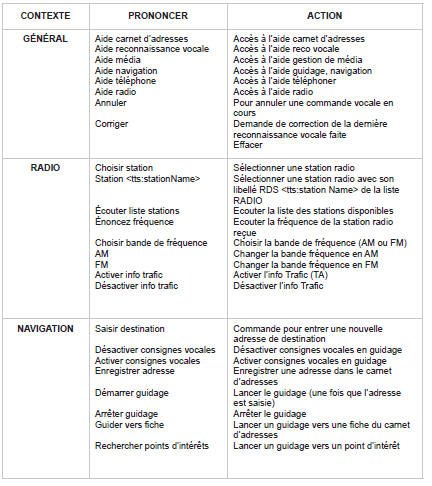
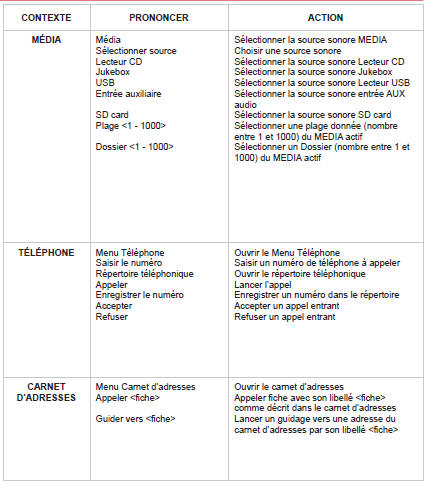
 The phrases to be spoken depending on context are listed in the tables below.
Speak, and NaviDrive 3D carries out the command.
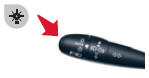
Pressing the end of the lighting control activates voice recognition.

STEERING WHEEL CONTROLS
- By successive presses: “Black Panel” mode - black screen (night driving).
- Short press to make a phone call.
Answer / Hang up.
Accesses the phone menu.
Displays the call log.
Long press rejects an incoming call.
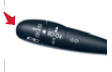
Short press: activates voice recognition.
Long press: hear the current navigation instruction again.
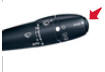
Successive presses: gives access to the Radio and Media screens depending on the current display.
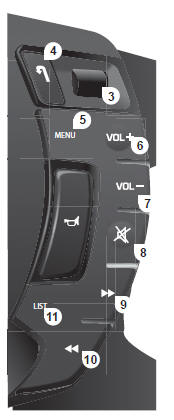
- Rotation: gives access to shortcut menus depending on the screen display.
Short press: confirms the choice displayed on screen.
Long press: returns to the general menu.
- Short press: cancels the current operation.
Rejects an incoming call.
Long press: returns to the initial display.
- Menu: gives access to the general menu.
- VOL +: increases volume.
- VOL -: decreases volume.
- By successive presses: mutes / restores sound.
- Short press: Radio: higher frequency.
Music players: next track.
Long press to fast-forward playback.
- Short press: Radio: lower frequency.
Music players: previous track.
Long press to fast-forward playback.
- Short press: displays the list of available radio frequencies or tracks, albums, folders.
Long press: updates the list of received stations.
Test yourself
A quick Citroen C5 Aircross quiz: every answer comes with an explanation and a link to the manual page.