Audio settings
Sound settings are accessed by pressing the "AUDIO" key.
Note: When the "internal radio mute" function is active, sound settings are adjusted without sound output from the speakers.
Setting order
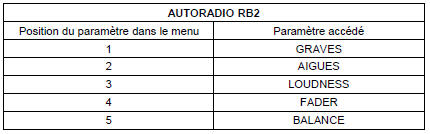
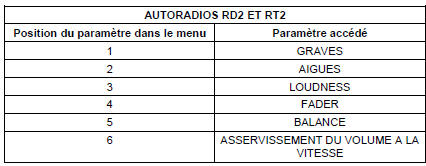
The order of parameter settings in the audio menu is as follows:
RB2 radio
RD2 and RT2 radios
Storing settings
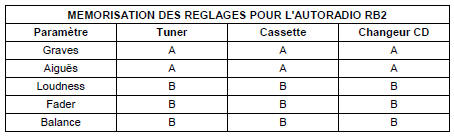
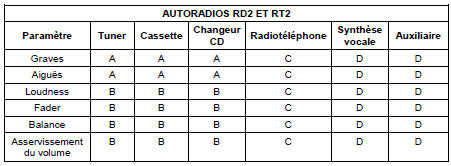
There are several types of setting storage, depending on the sources active when the setting is made. The tables below show the type of storage for the audio settings according to the active audio sources, for the different radios.
Key:
A: parameter stored separately
The parameter is stored and applied when the radio is switched on.
The setting is stored separately for the source it applies to.
B: Parameter stored
The parameter is stored and applied when the radio is switched on.
The setting applies to all audio sources.
C: Setting not possible
The parameter appears but cannot be adjusted or applied to the active source.
D: Parameter not stored
The parameter can be adjusted as long as the radio is operating.
When the radio is switched on, the parameter returns to its default value.
Test yourself
A quick Citroen C5 Aircross quiz: every answer comes with an explanation and a link to the manual page.