Touchscreen
This system provides access to the following items:
- Permanent display of the time and outside temperature (a blue indicator appears when there is a risk of ice).
- Heating / air conditioning controls.
- Settings menus for vehicle functions and equipment.
- Audio and phone controls and display of related information.
- Display of visual parking aid functions (graphic parking aid, Park Assist, etc.).
- Online services and display of related information.
- Massage mode and intensity adjustment for the front seats (depending on version).
- Navigation system controls and display of related information (depending on version).
For safety reasons, stop the vehicle before carrying out operations that require sustained attention.
Some functions cannot be accessed while driving.
Basic operation
► Use the buttons located below the touchscreen to access the menus, then press the touch keys shown on the touchscreen.
Some menus may be displayed on two pages: press the "OPTIONS" key to access the second page.
If no action is taken on the second page for a few moments, the first page is displayed automatically.
To deactivate / activate a function, select "OFF" or "ON".
 Setting a function
 Access additional information about the function
 Confirm
 Return to the previous page or confirm
Menus
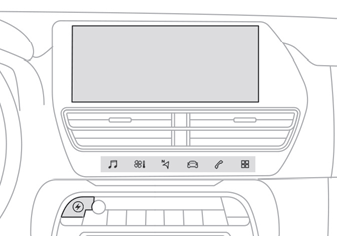
Press the touchscreen with three fingers to display all the menu keys.
For more information on the menus, refer to the sections describing the audio and telematics systems.
 Radio / Media
 Air conditioning
Temperature and airflow settings...
For more information on manual air conditioning and dual-zone automatic air conditioning, refer to the corresponding sections.
 Navigation (depending on equipment)
 Driving or Vehicle (depending on equipment)
Activation, deactivation and setting of certain functions.
The functions are grouped under 2 tabs: "Driving functions" and "Vehicle settings".
 Phone
 Applications
Display of available connected services and access to the Eco-coaching function.
 Settings
Main settings for the audio system, touchscreen and digital instrument cluster.
 Energy (depending on equipment)
Access to the functions of the plug-in hybrid system (energy flow, consumption statistics, delayed charging, eSave function).
Energy menu
This menu is only available with CITROËN Connect Nav.
Energy flow
This page shows how the plug-in hybrid system operates in real time.
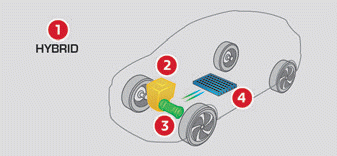
- Active driving mode
- Petrol engine
- Electric motor
- Traction battery charge level
Energy flows are colour-coded for each type of driving:
- Blue: 100% electric energy.
- Orange: energy from the petrol engine.
- Green: energy recovery.
Statistics
This page shows electric energy and fuel consumption statistics.
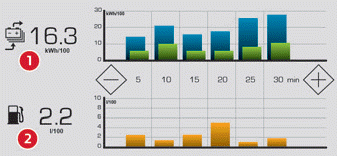
1. Average electric consumption for the current trip (kWh/100 km) and historical values:
- Blue bar chart: energy consumed directly from the traction battery.
- Green bar chart: energy regenerated during deceleration and braking phases to recharge the battery.
2. Average fuel consumption for the current trip (l/100 km) and historical values (orange bar chart).
► Press the - or + keys to change the time scale displayed.
A current trip is a trip of more than 20 minutes without switching off the ignition.
Charging
This page is used to schedule a delayed charge.
For more information on charging the traction battery (plug-in hybrid), refer to the corresponding section.
eSave
The eSave function allows all or part of the electric energy in the traction battery to be reserved for later use during a trip (for example, when entering an urban area or an area reserved for electric vehicles).
► Select the electric range to reserve (10 km, 20 km or the full MAX range), then activate the function by pressing ON.
 Activation of the function is confirmed by this indicator lighting on the instrument cluster and by the energy reserve shown in km.
► To use the energy reserve, select Electric driving mode on the mode selector.
If the requested range exceeds the available range (not recommended), the combustion engine starts to recharge the traction battery up to the requested threshold. This results in higher fuel consumption.
Information bar(s)
Certain information is permanently displayed in the bar(s) of the touchscreen.
- Time and outside temperature (a blue indicator appears when there is a risk of ice).
- Reminder of air conditioning information, and a direct access to the corresponding menu.
- Reminder of information from the Radio Media and Phone menus.
- Notifications.
- Access to touchscreen and digital instrument cluster settings (date/time, languages, units...).
Test yourself
A quick Citroen C5 Aircross quiz: every answer comes with an explanation and a link to the manual page.