USB Ports
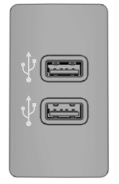
The USB ports are located in the center console or behind a small door in the instrument panel.
This feature lets you connect USB media, memory cards, flash drives or thumb drives, and charge devices if they support this function.
Select this option to play audio from your USB device.
Apps
The system supports certain audio applications, such as iHeartRadio, through a USB or Bluetooth-enabled device.
Each application provides different on-screen options depending on the application content. See Applications.
Supported Media Players, Formats, and Metadata
The system can support virtually any digital media player, including iPod, iPhone and most USB drives.
Supported audio formats include MP3, WMA, WAV, AAC, and FLAC.
Supported audio file extensions include MP3, WMA, WAV, M4A, M4B, AAC and FLAC.
Supported USB file systems include: FAT, exFAT and NTFS.
SYNC 3 can also sort media files on your USB device by metadata tags. Metadata tags are descriptive identifiers embedded in the media files that provide information about the file.
If your indexed media files do not contain information embedded in these metadata tags, SYNC 3 may classify the empty metadata tags as unknown.
SYNC 3 can index up to 50,000 songs per USB device for up to 10 devices.
Test yourself
A quick Ford Explorer quiz: every answer comes with an explanation and a link to the manual page.