Bleeding the fuel system (for vehicles with diesel engine)
If the fuel tank runs empty, the engine malfunction indicator lamp will come on on the instrument panel, or the pictogram “ ”.
In this case, the engine will not start after refueling (see pages 468 and 469).
In this case, air may enter the fuel system. To start the engine, bleed the fuel system as described below. Proceed as follows:
1. Add at least 5 liters of fuel to the tank.
2. Open the hood.
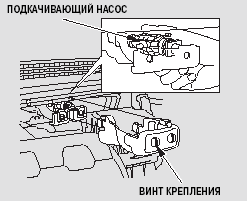
3. Loosen the two mounting screws, then remove the cover.
4. Pump the priming pump up and down until noticeable resistance is felt.

WARNING
Do not press down forcefully on the engine cover.
This may damage the cover and other components.
5. Start the engine (see page 320). If the engine does not start immediately, do not hold the engine start button pressed for more than 10 seconds. This may damage the fuel pump and starter.
6. If the engine still does not start, repeat step 4.
7. Once the engine starts running, lightly press the accelerator pedal to raise the crankshaft speed to approximately 1,500 min-1 (rpm) and hold it there for about 30 seconds.
This will completely remove air from the fuel system.
8. Reinstall the cover in front of the priming pump and securely tighten the mounting screws.
9. The engine will then run steadily, but the PGM FI malfunction indicator will not go off.
To turn off the indicator, start and stop the engine at least three times with a 30-second interval between each.
If this procedure is performed during normal driving, the indicator will go off and the PGM FI warning will disappear from the multi-information display.
If you are not sure you can complete the fuel system bleeding procedure yourself, contact your Honda dealer service station.
If the engine does not start after bleeding the fuel system, this indicates a system malfunction. Take your vehicle to an authorized Honda dealer for inspection and repair.
Test yourself
A quick Honda Civic quiz: every answer comes with an explanation and a link to the manual page.