Features
Changing the Home Screen Icon Layout
In this manual: Features
~1min read
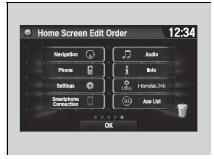
1. Select  .
2. Select and hold an icon.
- The screen switches to the customization screen.
3. Drag and drop the icon to where you want it to be.
4. Select OK.
- The screen will return to the home screen.
Test yourself
A quick Honda Civic quiz: every answer comes with an explanation and a link to the manual page.
Was this page helpful?