Features
Menu Customize
In this manual: Features
~1min read
You can change menu icons on the right side of Audio, Phone, and Info screen.
1. Select and hold menu icon.
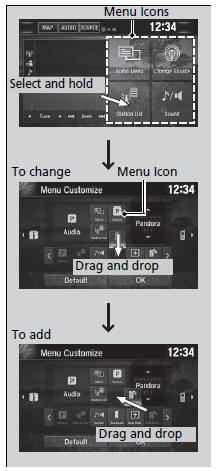
2. Select  or
 icon, then Audio, Phone, or Info from Menu Customize.
3. Select and hold the menu icon you want to change, then drag and drop the icon to the bottom.
4. Select and hold the menu icon you want to add, then drag and drop the icon to above.
5. Select OK.
Menu Customize
You can also use the method below to change menu icon: Select Settings  System
 Home tab
 Menu icon position
Test yourself
A quick Honda Civic quiz: every answer comes with an explanation and a link to the manual page.
Was this page helpful?