Features
Changing the Screen Interface
In this manual: Features
~1min read
You can change the screen interface design.
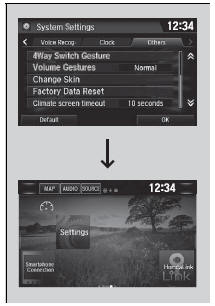
1. Select  .
2. Select Settings.
3. Select System.
4. Select the Others tab.
5. Select Change Skin.
6. A confirmation message appears on the screen. Select Yes.
Changing the Screen Interface
After changing the screen interface design, you can change the wallpaper by following procedure.
1. Select  .
2. Select and hold empty space on the home screen.
The pop-up menu appears on the screen.
3. Select Change Wallpaper.
4. Select Gallery, Live wallpapers, or Wallpapers.
If you change the screen interface, some of the setting items will change.
Customized Features
Test yourself
A quick Honda Civic quiz: every answer comes with an explanation and a link to the manual page.
Was this page helpful?