Driving Your Vehicle
LFA Settings and Operation
In this manual: Driving Your Vehicle
~1min read
System Settings
- With the ignition switch in the ON position, the Lane Following Assist can be activated by selecting "User Settings → Driver Assistance → Driving Assist → Lane Following Assist" on the cluster LCD. Deselect the option to turn off the system.
- If the engine is turned off and then turned back on, the system retains the last setting.
Operating Conditions
Select "Lane Keeping Assist" from the settings menu on the cluster LCD to display and satisfy the following conditions for the system to operate.
- Smart Cruise Control is operating
- Vehicle speed is below 95 mph (153 km/h)
When the system is activated, the indicator ( ) in the cluster will illuminate. The indicator color will change depending on the LFA system status.
- Green: Steering assist mode is ON.
- White: Steering assist mode is OFF.
LFA Operation
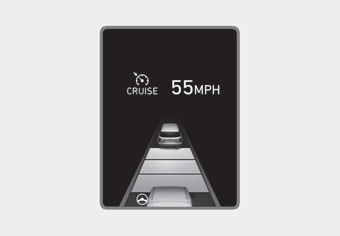
- If the vehicle is within the lane with both lane lines detected by the system (the lane line color changes from gray to white) and there is no sudden steering input by the driver, the LFA system switches to steering assist mode.
 The indicator light will turn green, and the system helps keep the vehicle centered in the lane by controlling the steering wheel.
When the steering wheel is not temporarily controlled, i.e., the indicator will flash green and change to white.
Test yourself
A quick Hyundai Palisade quiz: every answer comes with an explanation and a link to the manual page.
Was this page helpful?