Driving Your Vehicle
Releasing the Parking Brake
In this manual: Driving Your Vehicle
~2min read
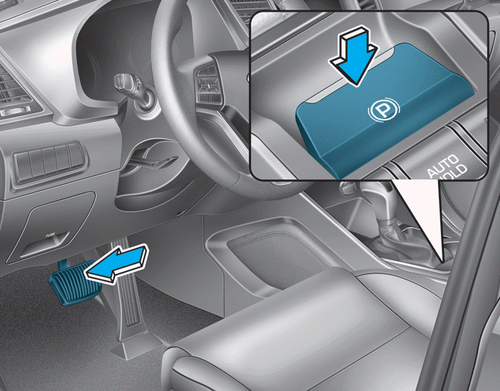
To release the EPB, press the switch under the following conditions:
- Set the engine start/stop button to the ON position.
- Press the brake pedal.
Make sure the parking brake indicator turns off.
To release the EPB automatically:
- Shift lever in P (Park)
With the engine running, depress the brake pedal and shift from P (Park) to R (Reverse) or D (Drive). - Shift lever in N (Neutral)
With the engine running, depress the brake pedal and shift from N (Neutral) to R (Reverse) or D (Drive). - Vehicle with automatic transmission
1. Start the engine.
2. Fasten the driver's seat belt.
3. Close the driver's door, hood and tailgate.
4. Depress the accelerator pedal when the shift lever is in R (Reverse), D (Drive) or sport mode.
Make sure the parking brake indicator turns off.
Information
- For your safety, the EPB can be applied even when the engine start/stop button is in the OFF position. However, it cannot be released.
- For safety, depress the brake pedal and manually release the parking brake using the EPB switch when driving downhill or uphill.
 NOTICE
- If the parking brake indicator remains on even when the EPB is released, we recommend having the vehicle inspected by an authorized HYUNDAI dealer.
- Do not drive the vehicle while the EPB is applied. This may cause premature wear of the brake pads and discs.
If the EPB does not release:
We recommend that you contact an authorized HYUNDAI dealer to have your vehicle transported on a flatbed truck to inspect the system.
The EPB may be applied automatically under the following conditions:
- The EPB overheats
- It is requested by other systems.
- The engine is off and the EPB is applied.
Information
If the driver turns off the engine while Auto Hold is enabled, the EPB is applied automatically. However, if the EPB switch is pressed within one second after the engine is stopped, the EPB will not be applied.
Test yourself
A quick Hyundai Tucson quiz: every answer comes with an explanation and a link to the manual page.
Was this page helpful?