Remote Key
Your HYUNDAI uses a remote key to lock or unlock the driver's door, passenger door, or tailgate.
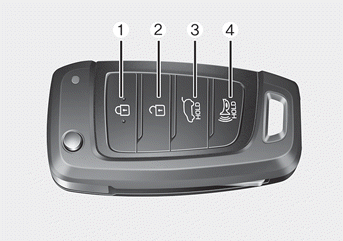
1 Door lock
2 Door unlock
3 Tailgate open (if equipped)
4 Panic
Locking the Vehicle
1. Close all doors, the hood and the tailgate.
2. Press the door lock button 1 on the remote key. The doors lock and the hazard warning lights flash.
3. Make sure the doors are locked by pulling the outside door handle.
WARNING
Do not leave the remote key in the vehicle with children unattended.
Children may accidentally place the key in the ignition switch or press the power windows and other controls, or even cause the vehicle to move, resulting in serious injury or death.
Unlocking the Vehicle
Press the door unlock button 2 on the remote key. The doors unlock and the hazard warning lights flash twice.
Two-Press Unlock Setting
If you press the door unlock button on the remote key again within four seconds, all doors unlock. The two-press unlock setting can be changed by the owner in the instrument panel under User Settings mode.
User Settings Mode Method
You can activate or deactivate the two-press unlock function in the settings menu of the instrument cluster.
Select: User Settings > Door > Two-Press Unlock
For more information, refer to the "Cluster Display" section in chapter 4.
Information
After unlocking the doors, the doors automatically lock again after 30 seconds if no door is opened.
Opening the Tailgate
Press and hold the tailgate open button.
Test yourself
A quick Hyundai Tucson LM quiz: every answer comes with an explanation and a link to the manual page.