Convenience
Steering Wheel Remote Controls
In this manual: Convenience
~1min read
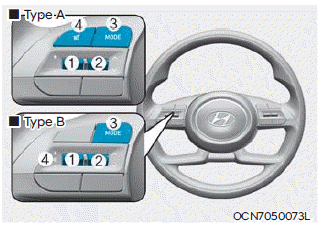
NOTICE
Do not operate multiple audio remote control buttons at the same time.
VOLUME (VOLUME + / VOLUME -) (1)
- Turn the VOLUME control up to increase the volume.
- Turn the VOLUME control down to decrease the volume.
SEEK/PRESET ( ˄ / ˅ ) (2)
If the SEEK/PRESET switch is pressed up or down and held for 0.8 seconds or more, it operates in the following modes:
- RADIO mode
It operates as the AUTO SEEK button. It seeks until you release the button. - MEDIA mode
It operates as the FF/RW button.
If the SEEK/PRESET switch is pressed up or down, it operates in the following modes:
- RADIO mode
It operates as the PRESET STATION UP/DOWN button. - MEDIA mode
It operates as the TRACK UP/DOWN button.
MODE (3)
Press the MODE button to switch between radio or media modes.
MUTE ( ) (4)
- Press the MUTE button to turn off the sound.
- Press the MUTE button again to restore the sound.
For more information, refer to the infotainment system manual.
Test yourself
A quick Hyundai Tucson LM quiz: every answer comes with an explanation and a link to the manual page.
Was this page helpful?