System Setting and Activation
Forward Safety
The driver can activate FCA by placing the ENGINE START/STOP button in the ON position and selecting:
"Settings → Vehicle → Driver Assistance → Forward Safety"
For more details, please scan the QR code in the separately supplied Vehicle Infotainment System Quick Reference Guide.
- If you select "Active Assist", FCA is activated. FCA provides warning messages and warning sounds according to collision risk levels. In addition, it controls the brakes according to collision risk levels.
- If you select "Warning Only", FCA is activated and provides only warning sounds according to collision risk levels. You must control the brakes directly, because FCA does not control the brakes.
- If you select "Off", FCA is deactivated.

The warning light illuminates on the LCD display when FCA is cancelled. The driver can check the FCA ON/OFF status on the LCD display. The warning light also illuminates when ESC (Electronic Stability Control) is turned off. If the warning light remains illuminated with FCA activated, have your vehicle inspected by an authorized Kia dealer.
The driver can select the initial warning activation timing on the infotainment system screen.
Warning Timing
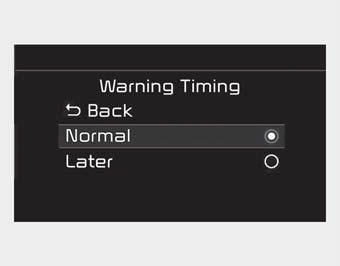
Go to "Settings → Vehicle → Driver Assistance → Warning Timing → Normal/Late".
The Forward Collision Warning timing options include the following:
- Normal:
When this option is selected, the forward collision initial warning is activated at the normal timing. This setting allows the nominal distance to the vehicle ahead before the initial warning is issued.
- Late:
When this option is selected, the forward collision initial warning is activated later than normal. This setting reduces the distance to the vehicle ahead, pedestrian or cyclist before the initial warning is issued.
Select "Late" when traffic is light and at low driving speeds.
If the vehicle ahead makes a sudden acceleration, the driver may notice the warning earlier, even though the later option is selected.
✽ NOTICE
If you change the warning timing, the warning timing of other systems may change. Always check the warning timing before changing it.
Activation Conditions
FCA is ready to activate when "Active Assist" or "Warning Only" under Forward Safety is selected on the infotainment system screen, and when the following conditions are met.
- ESC is activated.
- Vehicle speed is above 6 mph (10 km/h). (However, FCA is activated within a certain vehicle speed range.)
- A vehicle, pedestrian or cyclist is detected ahead. (However, FCA does not activate under the conditions where the front and vehicle systems do not recognize, but only certain warnings are given.)
- FCA does not operate properly or only provides warning sounds according to driving or vehicle conditions.
- If Warning Only under Forward Safety is selected, FCA provides only warning sounds according to collision risk levels.
✽ NOTICE
FCA may not operate properly depending on the forward situation, the direction of pedestrians or cyclists, and speed.
WARNING
- Completely stop the vehicle in a safe place before operating the steering wheel switch to turn FCA on/off.
- FCA is automatically activated when the ENGINE START/STOP button is set to the ON position. The driver can deactivate FCA by cancelling the system setting on the infotainment system screen.
- FCA is automatically deactivated when ESC is cancelled. When ESC is cancelled, FCA cannot be activated on the infotainment system screen. The FCA warning light illuminates, which is normal.
Test yourself
A quick Kia Cadenza VG Owner's Manual quiz: every answer comes with an explanation and a link to the manual page.