Vehicle Recognition
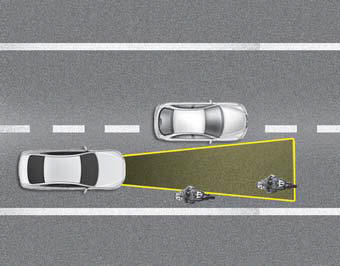
Some vehicles ahead in your lane may not be detected by the sensor in the following cases:
- Narrow vehicles, such as motorcycles or bicycles
- Vehicles offset to one side
- Slow-moving vehicles or vehicles that decelerate suddenly
- Stopped vehicles
- Vehicles with a small rear profile, such as unloaded trailers
The vehicle ahead may not be detected correctly by the sensor if any of the following occur:
- When the vehicle is tilted upward due to a load in the rear cargo area (liftgate)
- When making steering wheel maneuvers
- When driving on one side of the lane
- When driving on narrow lanes or on curves
Adjust your vehicle speed by pressing the brake pedal according to the road conditions ahead and driving conditions.
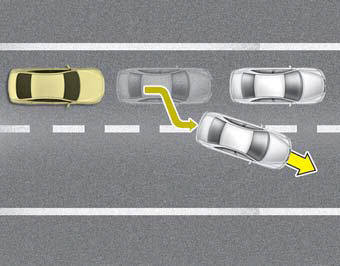
- When vehicles are stopped and the vehicle ahead changes to the next lane, be careful when your vehicle starts moving, because it may not recognize the stopped vehicle ahead of you. In this case, maintain a safe braking distance and, if necessary, press the brake pedal to reduce speed to keep a safe distance.
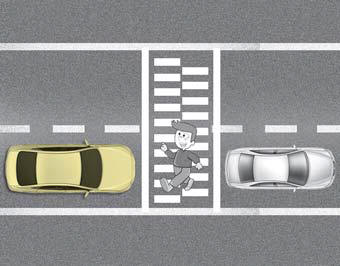
- Always pay attention to pedestrians when your vehicle maintains distance from the vehicle ahead.
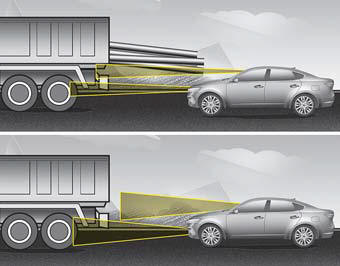
- Always be careful with vehicles of greater height or vehicles carrying loads protruding from the rear of the vehicle.
WARNING
When using Smart Cruise Control, observe the following precautions:
- If emergency braking is required, you must apply the brakes. The vehicle cannot be stopped in every emergency situation using Smart Cruise Control.
- Maintain a safe distance according to road conditions and vehicle speed. If you approach too closely at high driving speed, a serious collision may result.
- Always maintain sufficient braking distance and decelerate your vehicle by applying the brakes when necessary.
- Smart Cruise Control cannot recognize stopped vehicles, pedestrians, or oncoming vehicles. Always watch ahead carefully to prevent unexpected and sudden situations from occurring.
- Vehicles moving ahead of you with frequent lane changes may cause a delay in system response or may cause the system to react to a vehicle actually in an adjacent lane. Always drive carefully to prevent unexpected and sudden situations from occurring.
- Always be aware of the set speed and driving conditions. The driver must not rely solely on the system, but always pay attention to driving conditions and control vehicle speed.
- Smart Cruise Control may not recognize all road situations, so always pay attention to the driving conditions and control the vehicle speed.
- Smart Cruise Control may recognize pedestrians, bicycles, motorcycles, etc. as vehicles. Always look ahead carefully to prevent sudden and unexpected situations.
- Turn off Smart Cruise Control when the vehicle is being towed.
✽ NOTICE
Smart Cruise Control may temporarily not operate due to:
- Electrical interference
- Suspension modification
- Differences in tire wear or tire pressure.
- Installation of different types of tires. Brake control with Smart Cruise Control may produce noise.
This device complies with Part 15 of the FCC Rules.
Operation depends on the following three conditions:
1. This device may not cause harmful interference, and
2. This device must accept any interference received, including interference that may cause undesired operation.
3. Changes or modifications not expressly approved by the party responsible for compliance could void the user's authority to operate the equipment.
Test yourself
A quick Kia Cadenza VG Owner's Manual quiz: every answer comes with an explanation and a link to the manual page.