Intelligent Cruise Control (Stop & Go) System
General Safety Information and Precautions
General Safety Information and Caution
Be careful when driving with the Smart Cruise Control system, as follows.
Description and Operation
Description
The Smart Cruise Control system allows the driver to program the vehicle to control speed and following distance by detecting the vehicle ahead, without pressing the brake pedal or the accelerator pedal.
Cruise control speed: The vehicle maintains the selected speed when there are no vehicles ahead.
Deceleration Control: The vehicle decelerates when a vehicle ahead is detected.
Distance control: The vehicle maintains the selected distance.
Acceleration control: The vehicle accelerates to the selected speed when no vehicle ahead is detected.
Congested area control: In traffic, your vehicle will stop if the vehicle ahead of you stops. Also, if the vehicle ahead starts moving, your vehicle will also start. However, if your vehicle has been stopped for more than 3 seconds, you must depress the accelerator pedal or press the RES+ switch to start moving.
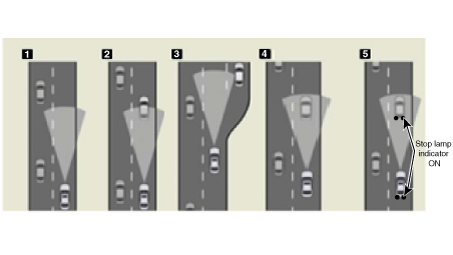
Cornering Control
The sensor may not detect a vehicle ahead, or it may detect a vehicle in other lanes, because the sensor detection range is limited.
On curves, if a vehicle equipped with SCC is traveling at high speed, the vehicle may slide outward. Therefore, reduce speed on curves, even if there is no vehicle ahead.
If the vehicle ahead enters a curve while your vehicle is following it on a straight road, the vehicle equipped with SCC may accelerate to maintain the set following distance.
On curved roads, if the vehicle ahead disappears, the vehicle will not accelerate to the set speed. It maintains the previous speed to prevent repeated acceleration/braking. (If the driver changes lanes or depresses the accelerator pedal, the vehicle then accelerates.)
Warning Signal
If a vehicle equipped with SCC decelerates because the vehicle ahead decelerates or moves into your lane, the warning will activate.
If the vehicle equipped with SCC cannot decelerate properly by the system – without warning
If the vehicle equipped with SCC cannot decelerate properly by the system
The LCD in the cluster will flash, and a warning message will appear. A buzzer will sound. (The warning and deceleration system will continue to operate until the brake pedal is depressed.)
If the vehicle ahead (vehicle speed: less than 30 km/h) moves into the next lane while the system is monitoring the following distance, a warning chime will sound and a message will appear. Adjust your vehicle speed for vehicles or objects that may suddenly appear ahead of you.
Driver Acceleration
Even when the vehicle is decelerated by the SCC system, the vehicle can be accelerated by pressing the accelerator pedal. When the SCC indicator is on and the driver presses the accelerator pedal, the LCD display in the cluster will flash.
Cruise Control Function
The driver can use only the cruise control mode (speed control function) by performing the following:
When the Smart Cruise Control system is on (SCC Standby mode), press and hold the distance switch for more than 2 seconds to switch between "Smart Cruise Control (SCC)" and "Cruise Control (CC)" modes. The cruise control mode is the same as the Smart Cruise Control mode.
When using the cruise control mode, the driver must manually control the distance to other vehicles, because the system will not automatically brake to reduce speed for other vehicles.
Cruise Control Main Switch (CRUISE)
The Smart Cruise Control system is turned on by pressing the cruise "ON/OFF" main switch.
SET/– switch
The "SET/–" switch, located on the right side of the steering column, has two functions.
Set Function: Press and release the "SET/–" switch at the desired speed. Release the accelerator pedal. The desired speed will be maintained automatically.
At low speeds of 10–180 km/h, the vehicle must be behind the vehicle ahead of the driver. The target speed is set to 30 km/h.
Coast Function: Press and hold the "SET/–" switch when Smart Cruise Control is on. The vehicle will gradually decelerate. Release the switch at the desired speed.
The desired speed will be maintained. Press and quickly release the "SET/–" switch.
When the "SET/–" switch is quickly pressed and released, the cruise speed will decrease by 1 km/h. Also, when the "SET/–" switch is pressed and held, the cruise control speed will decrease by 5.0 mph.
Resume/Accel Switch (RES/+)
The "RES/+" switch, located on the right side of the steering column, has two functions.
Resume Function: If any method other than the cruise "ON/OFF" main switch was used to temporarily cancel the cruise speed and the system is still activated, the most recently set speed will automatically resume when the "RES/+" switch is pressed.
Acceleration function: Press and hold the "RES/+" switch while Smart Cruise Control is active. The vehicle will accelerate gradually. Release the switch at the desired speed. The desired speed will be maintained.
Briefly press and release the "SET/+" switch to increase the cruise speed by 1 km/h. Alternatively, press and hold the "RES/+" switch to increase the cruise control speed by 5.0 mph.
CANCEL switch
The cruise control system is temporarily canceled by pressing the "CANCEL" switch.
Following Distance Control Switch
This system helps you set a distance to the vehicle ahead and maintain the selected following distance, even when you do not press the accelerator pedal or the brake pedal.
Select an appropriate following distance according to road conditions and vehicle speed.
Each time the button is pressed, the following distance changes as follows:
For example: Distance 4 → Distance 3 → Distance 2 → Distance 1 → Distance 4
When driving at 90 km/h, the following distance is maintained as follows:
Distance 4 — approximately 52.5 m (172.2 ft)
Distance 3 — approximately 40 m (131.2 ft)
Distance 2 — approximately 30 m (98.4 ft)
Distance 1 — approximately 25 m (82.0 ft)
The following distance for each step changes depending on the speed of the vehicle ahead.
Circuit Diagrams
Symptom Troubleshooting Tables

Components and Function Description
| Component | Function |
| Cruise control switch | Input the set speed and distance into the SCC ECU. |
| Instrument Cluster | Display various information input from the SCC. |
| Smart Cruise Control | Recognize and track the vehicle ahead. Calculate the speed and distance to the target Request acceleration and deceleration from the ESP |
| DC Hydraulic Electronic Control Unit (HECU) | Automatic braking and engine torque control request to Engine Control Module (ECM) EPB torque control request to Electronic Parking Brake (EPB) Request brake light switch activation |
| Engine (ECM) | Control engine torque |
| Electronic Parking Brake (EPB) | Monitor EPB torque |
| Stop Lamp | Brake light illuminates |
Test yourself
A quick Kia Stinger CK quiz: every answer comes with an explanation and a link to the manual page.