Vehicle Specifications
2. Select the parking assist mode.
In this manual: Vehicle Specifications
~1min read
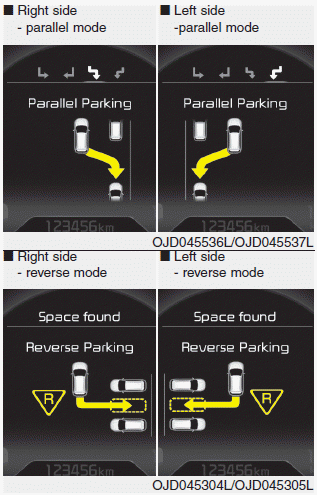
- Select the parking assist mode by pressing the Smart Parking Assist System button with the shift lever in N (Neutral) or D (Drive) and the brake pedal depressed. If the vehicle speed has not exceeded 5 km/h with the ignition switch in the ON position, move the shift lever to N (Neutral) to select the parallel exit mode.
- The right-side parallel mode is selected automatically when the Smart Parking Assist System is activated.
- To select the left-side parallel mode, press the Smart Parking Assist System button again.
- Pressing the button again will turn the system off.
- The mode changes from parallel mode (right → left) to reverse mode (right → left) whenever the Smart Parking Assist System button is pressed. (For left-hand drive)
- The mode changes from parallel mode (left → right) to reverse mode (left → right) whenever the Smart Parking Assist System button is pressed. (For right-hand drive)
Test yourself
A quick Kia Cee'd quiz: every answer comes with an explanation and a link to the manual page.
Was this page helpful?