Answering Calls
Answering a Call
When a call is received with a Bluetooth® wireless technology device connected, the following screen is displayed.
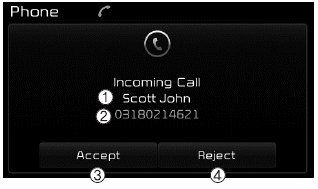
(1) Caller: Displays the name of the incoming caller when the caller is saved in your phonebook
(2) Incoming number: Displays the incoming number
(3) Accept: Accepts the incoming call
(4) Reject: Rejects the incoming call
✽ NOTICE
- When the incoming call pop-up is displayed, most Audio and SETUP mode functions are disabled. Only the call volume will work.
- The phone number may not be displayed correctly on some mobile phones.
- When answering a call with the mobile phone button, the call mode will automatically return to private mode.
During a Hands-Free Call
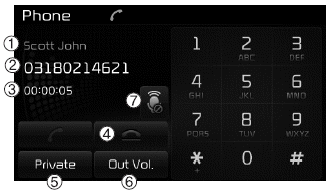
(1) Caller: Displays the name of the other party if the incoming caller is saved in your phonebook.
(2) Incoming number: Displays the incoming number.
(3) Call time: Displays the call duration.
(4) End: Ends the call.
(5) Private: Switches to private mode.
(6) Vol.: Adjusts the call volume to the level heard by the other party.
(7) Mute: Turns the microphone mute function on/off.
✽ NOTICE
If the microphone is muted, the other party will not be able to hear your voice.
Test yourself
A quick Kia Cee'd quiz: every answer comes with an explanation and a link to the manual page.