Pairing with the PHONE Key on the Steering Wheel Remote Controller
When no device has been paired
1. Press the key or
 key on the steering wheel remote controller. The following screen appears.
2. Press the button to enter the phone pairing screen.
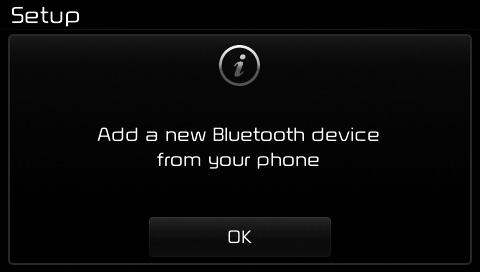
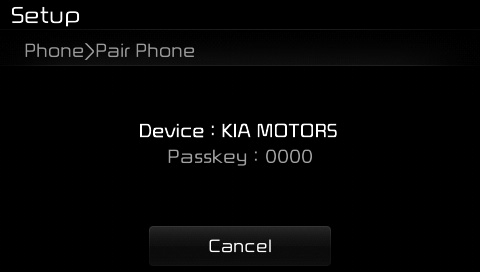
(1) Device: The device name as it appears when searched from your Bluetooth® wireless technology device
(2) Passkey: The passkey used to pair the device
3. From your Bluetooth® wireless technology device (for example, a mobile phone), search for and select your vehicle audio system.
[Device not supporting SSP]
(SSP: Secure Simple Pairing)
4. After a few seconds, the screen showing the entered passkey appears.
Enter the passkey "0000" to pair your Bluetooth® wireless technology device with the vehicle audio system.
[Device Supporting SSP]
4. After a few seconds, the 6-digit passkey screen appears.
Check the passkey on your Bluetooth® wireless technology device and confirm.
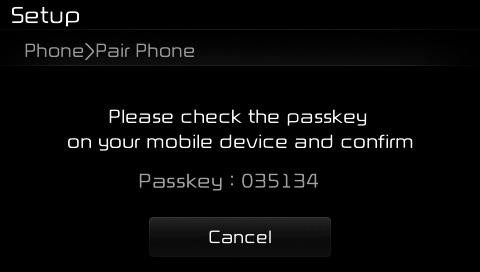
5. When pairing is complete, the following screen appears.
Some phones (for example, iPhone®, Android and BlackBerry phones) may offer the option to allow all future Bluetooth connection requests by default." and "Visit http://www.kia.com/#/bluetooth for more information on pairing a mobile phone with Bluetooth and for a list of compatible phones.
✽ NOTICE
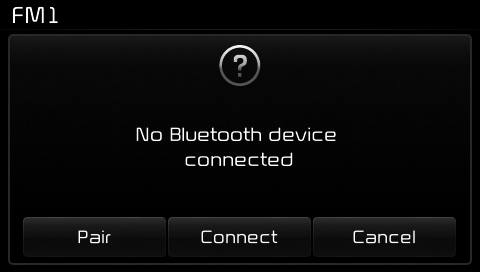
If Bluetooth® wireless technology devices are paired but none is currently connected, press the key or key on the steering wheel to display the following screen. Press the [Pair] button to connect a new device, or press the [Connect] button to connect a previously paired device.
Test yourself
A quick Kia Cee'd quiz: every answer comes with an explanation and a link to the manual page.