Vehicle Specifications
Phone Menu Screen
In this manual: Vehicle Specifications
~1min read
Phone Menu
When a Bluetooth® wireless technology device is connected, press the key to display the phone menu screen.
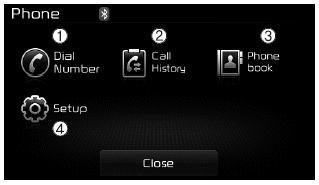
(1) Dial Number: Displays the dial screen, where the numbers to call can be entered
(2) Call History: Displays the call history list screen
(3) Phonebook: Displays the phonebook list screen
(4) Setup: Displays the phone setup settings
✽ NOTICE
- If you press the [Call History] button but there is no call history data, a prompt is displayed asking whether to download the call history data.
- If you press the [Phonebook] button but there is no phonebook data, a prompt is displayed asking whether to download the phonebook data.
- This function may not be supported on some mobile phones. For more information on download support, refer to your mobile phone's user manual.
Test yourself
A quick Kia Cee'd quiz: every answer comes with an explanation and a link to the manual page.
Was this page helpful?