Vehicle Specifications
Call History
In this manual: Vehicle Specifications
~1min read
press Select the [Call History] key.
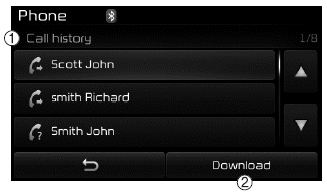
A list of incoming, outgoing, and missed calls is displayed.
Press the [Download] button to download the call history.
(1) Call history:
- Displays recent calls (call history)
- Connects the call when selected
(2) Download: Downloads the recent call history
✽ NOTICE
- The call history list will display up to 50 outgoing, incoming, and missed calls.
- After the call history is downloaded, the previously saved call history is deleted.
- Incoming calls from callers with hidden caller IDs will not be saved in the call history list.
- Previously saved phonebook entries are retained even if the device is disconnected and reconnected.
- The download function may not be supported by some mobile phones. Make sure that the Bluetooth® Wireless Technology device supports the download function.
Test yourself
A quick Kia Cee'd quiz: every answer comes with an explanation and a link to the manual page.
Was this page helpful?