Body Electrical System
Audio system
In this manual: Body Electrical System
8steps
~48min
3/5difficulty
Done 0 of 8
Components and Component Location
Components
[Radio/MP3/Bluetooth (Type A)]
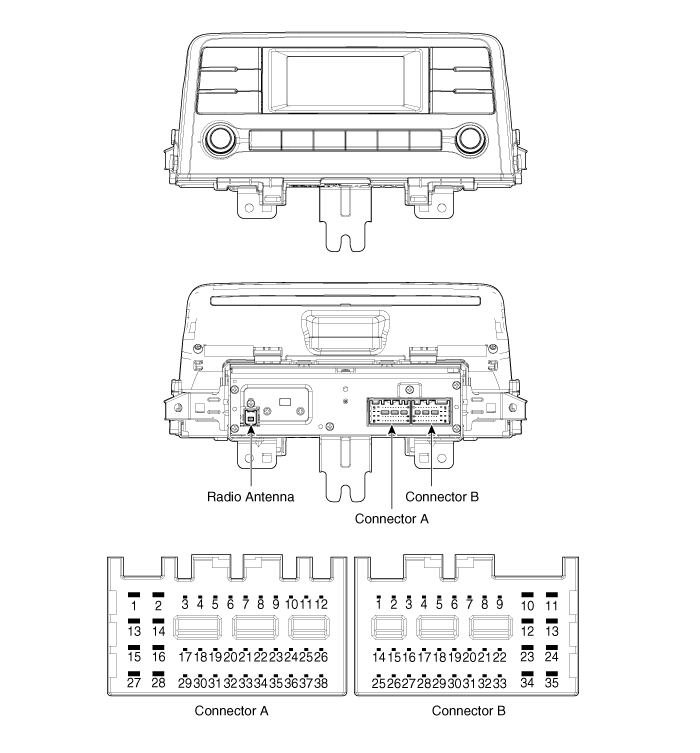
| No. | Connector A | Connector B |
| 1 | Left rear door speaker (+) | - |
| 2 | Left rear door speaker (-) | MIC (+) |
| 3 | USB ground | - |
| 4 | USB Data (+) | Latch |
| 5 | USB Data (-) | Antenna Power |
| 6 | USB VCC | Illumination (+) |
| 7 | - | Non-e-Call type: - e-Call type: Multimedia CAN (High) |
| 8 | - | - |
| 9 | - | - |
| 10 | AUX Audio Input_Right | Battery (+) |
| 11 | AUX Detection | Battery (+) |
| 12 | Steering Wheel Remote Control | Ground |
| 13 | Left front door speaker (+) | Ground |
| 14 | Left front door speaker (-) | - |
| 15 | Right front door speaker (-) | MIC (-) |
| 16 | Right front door speaker (+) | - |
| 17 | - | - |
| 18 | - | Vehicle Speed |
| 19 | - | Illumination (-) |
| 20 | - | Non-e-Call type: - e-Call type: Multimedia CAN (Low) |
| 21 | - | - |
| 22 | - | ACC |
| 23 | - | - |
| 24 | AUX Audio Input_Left | - |
| 25 | AUX Audio_Ground | - |
| 26 | Steering Wheel Remote Control (Ground) | - |
| 27 | Right rear door speaker (-) | - |
| 28 | Right rear door speaker (+) | - |
| 29 | - | - |
| 30 | - | - |
| 31 | - | - |
| 32 | - | - |
| 33 | - | - |
| 34 | - | - |
| 35 | - | - |
| 36 | - | |
| 37 | - | |
| 38 | - |
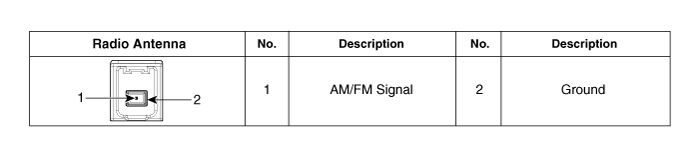
[Radio/MP3/Bluetooth (Type B)]
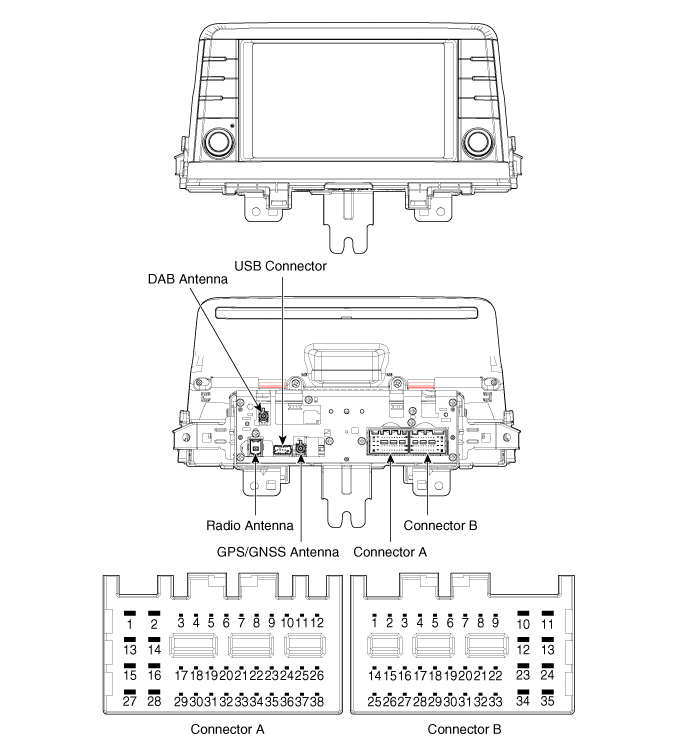
| No. | Connector A | Connector B |
| 1 | Left rear door speaker (+) | - |
| 2 | Left rear door speaker (-) | MIC (+) |
| 3 | - | - |
| 4 | - | - |
| 5 | - | Antenna Power |
| 6 | Camera Power | Illumination (+) |
| 7 | Camera Video | Non-e-Call type: - e-Call type: Multimedia CAN (High) |
| 8 | - | - |
| 9 | - | ALT Left Output (-) |
| 10 | AUX Audio Input_Right | Battery (+) |
| 11 | AUX Detection | Battery (+) |
| 12 | Steering Wheel Remote Control | Ground |
| 13 | Left front door speaker (+) | Ground |
| 14 | Left front door speaker (-) | MIC Ground |
| 15 | Right front door speaker (-) | MIC (-) |
| 16 | Right front door speaker (+) | - |
| 17 | - | - |
| 18 | - | - |
| 19 | - | Illumination (-) |
| 20 | Camera Power _ Ground | Non-e-Call type: - e-Call type: Multimedia CAN (Low) |
| 21 | Camera Video _ Ground | - |
| 22 | - | ACC |
| 23 | - | - |
| 24 | AUX Audio Input_Left | - |
| 25 | AUX Audio_Ground | Provide Regression |
| 26 | Steering Wheel Remote Control (Ground) | Door Open |
| 27 | Right rear door speaker (-) | Door Unlock |
| 28 | Right rear door speaker (+) | Parking Brake |
| 29 | - | "P" Position |
| 30 | - | Tail Lamp |
| 31 | - | - |
| 32 | - | - |
| 33 | VIN_Shield Camera | IGN1 |
| 34 | - | - |
| 35 | - | - |
| 36 | - | |
| 37 | - | |
| 38 | Vehicle Speed |
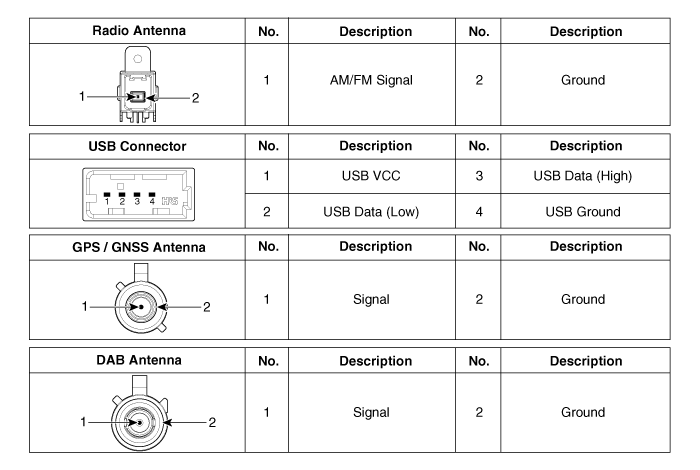
Repair Procedures
Removal
- Disconnect the negative (-) battery terminal.
- Remove the center panel. (Refer to Body - "Center Panel")
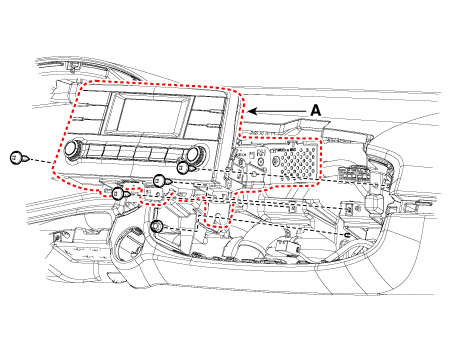
- Remove the head unit (A) after loosening the mounting screws and nuts.
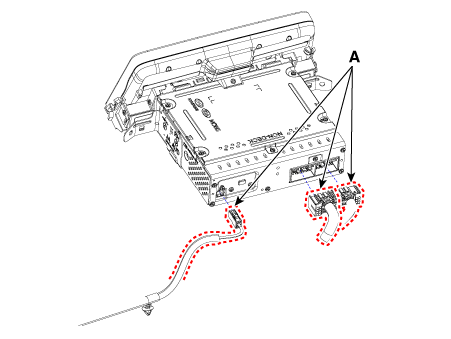
- Remove the head unit by disconnecting the connectors and the antenna cable (A).
Installation
- Connect the audio unit connectors and the antenna cable.
- Install the head unit.
- Install the center fascia panel.
- Connect the negative (-) battery terminal.
Test yourself
A quick Kia Picanto JA quiz: every answer comes with an explanation and a link to the manual page.
Was this page helpful?