Battery replacement
In this manual: Battery replacement
3steps
~18min
2/5difficulty
Done 0 of 3
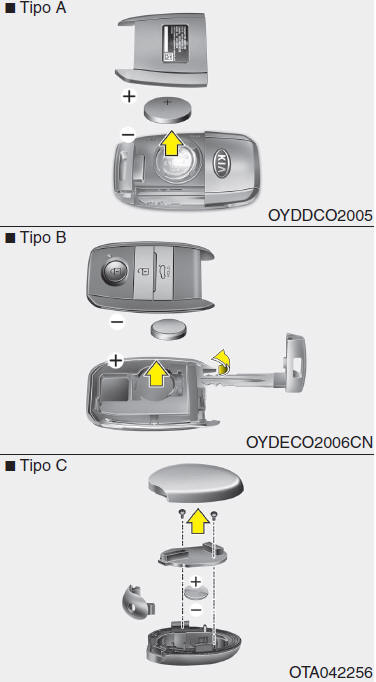
The transmitter uses a 3-volt lithium battery, which normally lasts several years. When replacement is required, follow the procedure below.
- Insert a thin tool into the slot and gently pry open the transmitter's center cover.
- Replace the battery with a new one. When replacing the battery, note the battery position.
- Install the battery by reversing the removal procedure.
To replace transmitters, contact an authorized Kia dealer for the necessary reprogramming.
WARNING Replace the battery of the auxiliary smart key with a new one every year. Replace the battery as soon as possible if the KEY indicator light comes on.WARNING
- The transmitter or smart key is designed to provide years of reliable operation; however, it may fail if exposed to moisture or static electricity. If you are not sure how to use or replace the battery, contact an authorized Kia dealer.
- Using an incorrect battery may cause the transmitter or smart key to malfunction. Be sure to use the correct battery.
- To avoid damaging the transmitter or smart key, do not drop it, get it wet, or expose it to heat or direct sunlight.
Test yourself
A quick Kia Picanto JA quiz: every answer comes with an explanation and a link to the manual page.
Was this page helpful?