High beam assist. Fog light switch
The High Beam Assist of the Lexus GS L10 simplifies night driving by automatically switching between low beam and high beam. The system takes street lighting, vehicles ahead, and oncoming vehicles into account, thus ensuring maximum visibility with minimal glare. This chapter describes activating the assist as well as manual control options. Important warnings help prevent malfunctions and ensure safe use of the system – ideal for comfortable driving in the dark.
High Beam Assistant
The High Beam Assist uses a camera sensor installed in the vehicle to evaluate the brightness of street lighting as well as the lights of vehicles ahead of your vehicle, etc., and switches the high beams on or off as needed.
WARNING
High Beam Assist Limitations
Do not rely on the High Beam Assist. Always drive with care, pay attention to your surroundings, and switch the high beams on or off manually as needed.
How to Prevent High Beam Assist Malfunction
Do not overload the vehicle.
Activating the High Beam Assist
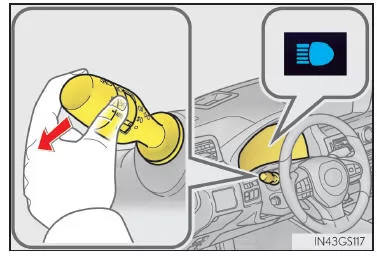
- Push the lever away from you while the headlight switch is in the
 or
 position.
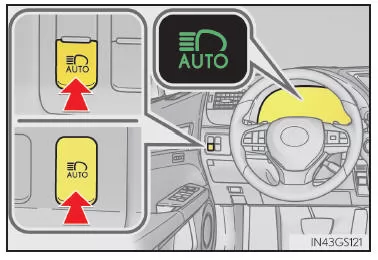
- Press the High Beam Assist switch.
The High Beam Assist indicator light illuminates when the headlights are switched on automatically, to indicate that the system is active.
Manually turning the high beams on/off
Switching to low beams
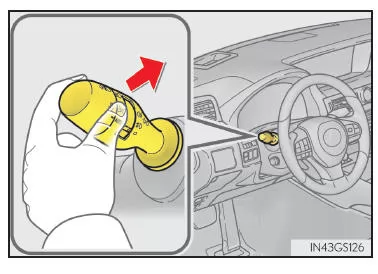
Pull the lever back to its original position.
The High Beam Assist indicator light turns off.
Push the lever away from you to reactivate the High Beam Assist.
Switching to high beams
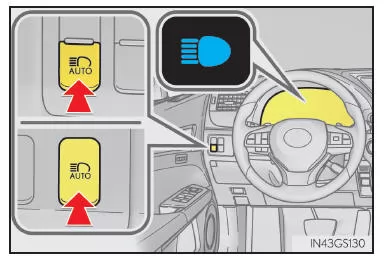
Press the High Beam Assist switch.
The High Beam Assist indicator light turns off and the high beam indicator light illuminates.
Press the switch to reactivate the High Beam Assist.
Conditions for Automatic High Beam On/Off
- When all of the following conditions are met, the high beams are switched on automatically (after approx. 1 second):
- When any of the following conditions is met, the high beams are switched off automatically:
Information on detection by the camera sensor
- In the following situations, the high beams may not be switched off automatically:
- The high beams may be switched off when a vehicle ahead is detected with its fog lights on while the headlights are off.
- House lights, street lights, traffic signals, and illuminated billboards or signs may cause the high beams to switch to low beams or the low beams to stay on.
- The following factors may affect the time it takes for the high beams to switch on or off:
- The high beams may switch on or off when the driver does not expect it.
- Bicycles and similar objects may not be detected.
- In the situations listed below, the system may not be able to correctly detect the ambient brightness. This may cause the low beam to stay on, or the high beam to dazzle pedestrians, drivers of vehicles ahead of your vehicle or other road users. In these cases, switch manually between high beam and low beam.
Warning message
Warning messages indicate a system malfunction or alert the driver that special caution is required.
Fog light switch
The fog lights help you see better in difficult driving conditions, such as rain or fog.
GS350/GS200t
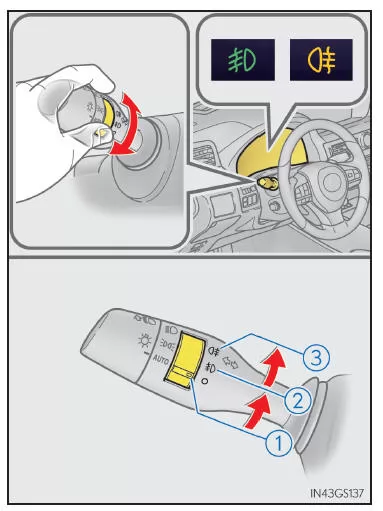
 Turn off the front fog lights and rear fog light
 Turn on the front fog lights
 Turn on the front fog lights and rear fog light
When you release the switch ring, it returns to theoriginal position.
When the switch ring is operated again, only the rear fog light is turned off.
GS F
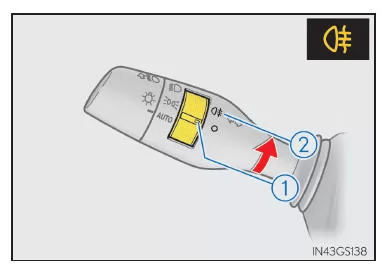
 Turn off the rear fog light
 Turn on the rear fog light
When you release the switch ring, it returns to its original position.
When the switch ring is operated again, only the rear fog light is turned off.
Requirements for using the fog lights
GS350/GS200t
Front fog lights: The headlights or front parking lights are on.
Rear fog light: The front fog lights are on.
GS F
The headlights are on.
The high beam assist of the Lexus GS GRL1 2016–2020 supports the driver by automatically switching the high beams on and off depending on the traffic situation. This illuminates the road optimally without dazzling other drivers. The system operates unobtrusively and increases safety when driving at night.
The fog lights are also a valuable addition for difficult weather conditions. The simple operation and the clear feedback via indicator lights make the system particularly easy to use.
FAQWhen does the high beam assist become active?
It activates automatically in darkness and at a speed of approx. 40 km/h when no other vehicles are nearby.
Can the fog lights be used independently of the high beams?
Yes, the fog lights can be controlled independently of the high beams and are designed for poor visibility conditions.
Test yourself
A quick Lexus GS quiz: every answer comes with an explanation and a link to the manual page.