Monitor, Climate, Audio, Phone and Voice Recognition Systems
Touch Screen Operating Instructions
In this manual: Monitor, Climate, Audio, Phone and Voice Recognition Systems
~2min read
WARNING
- The glass display screen may break if struck by a hard or sharp object. If the glass screen breaks, do not touch it. Otherwise, you may be injured.
- Never clean the screen with a rough cloth, alcohol, benzine, thinners, solvents, or a paper towel soaked in a chemical cleaner. These products may scratch or damage the screen.
- Do not splash or spray any liquid (water or car air freshener) on the screen. Any liquid on the screen will cause the device to malfunction.
For safety reasons, some functions cannot be accessed while driving.
On-screen functions that cannot be accessed while driving are shaded or muted.
Park the vehicle in a safe location, then use the navigation system.
WARNING
- ALWAYS keep your full attention on driving.
- Avoid using vehicle features that could distract you. If you are distracted, you could lose control of your vehicle and cause an accident.
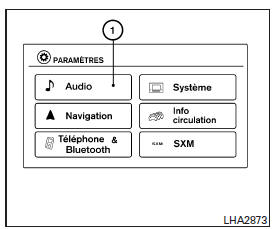
Using the Touch Screen
| Menu options | Result | |
| Selecting an on-screen option: | To select an option, simply touch it. To select the "Audio" key, press the "Audio" key 1 on the screen. Select the "BACK" key to return to the previous screen. | |
| Adjusting On-Screen Options | Press the "+" or "-" key to make the desired adjustments. Press the up arrow to scroll the page up one item at a time, or press the double arrow to scroll the entire page up. Touch the arrow to scroll the page down one item at a time, or touch the double arrow to scroll the entire page down. | |
| Character Entry | Select the desired letter or number key. The system offers certain character entry options. | |
| 123/ABC | Changes the character set to numbers. | |
| Space | Inserts spaces. | |
| Delete | Deletes the last character entered, one key at a time. Press and hold the "Delete" key to delete all characters. | |
| OK | Completes the character entry. | |
Touch Screen Maintenance
Use a soft, dry cloth to clean the screen. If additional cleaning is required, use a soft cloth lightly dampened with a neutral detergent. Never spray the screen with water or detergent. Dampen the cloth first, then wipe the screen.
Using the BACK Button
Press the BACK button
(BACK) to return to the previous screen.
Test yourself
A quick Nissan Altima quiz: every answer comes with an explanation and a link to the manual page.
Was this page helpful?