Monitor, Climate, Audio, Phone and Voice Recognition Systems
Using the APPS Button
In this manual: Monitor, Climate, Audio, Phone and Voice Recognition Systems
2steps
~12min
1/5difficulty
Done 0 of 2

For more information on the "SiriusXM Travel Link" and "SiriusXM Traffic" features, refer to the separate navigation system owner's manual.
For more information on the "My Apps" key, refer to the "Smartphone Integration with NissanConnect App (if so equipped)" section in this chapter.
For more information on the "Voice Recognition" key, refer to the "NISSAN Voice Recognition System" section in this chapter.
You can select or adjust various modes, functions, and settings that are available on your vehicle:
- Press the APPS (applications) button.
- Select the "Settings" key.
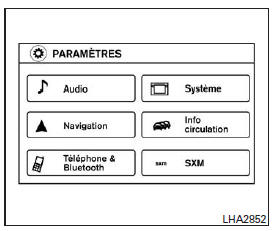
- Select the desired item.
| Menu Option | Result | |
| Audio | For more information, refer to the "Audio System" section in this chapter. | |
| Navigation | Refer to the navigation system owner's manual for more information. | |
| Phone & Bluetooth | Refer to the "Bluetooth Hands-Free Phone System with Navigation System" section in this chapter. | |
| System | Select this key to choose or adjust the various functions of this system. A screen with additional options will be displayed. | |
| Display | Select this key to adjust the display. | |
| Brightness | Adjusts the brightness of the screen. | |
| Display Mode | Adjusts the display according to the interior lighting level. Press the key to scroll through the options. The "Day" and "Night" modes are suitable for the corresponding times of day, while the "Auto" mode controls the display automatically. | |
| Scroll Direction | Adjusts the direction in which menus scroll. Select "Up" or "Down". | |
| Clock | Select this key to adjust the time. | |
| Time Format | The clock can be set to 12-hour or 24-hour format. | |
| Date Format | Choose from five possible formats for displaying the day, month, and year. | |
| Clock Mode | Adjusts the clock mode. The "Auto" mode uses the system's GPS to keep the time set automatically. The "Manual" mode lets you set the clock using the "Set Clock Manually" key. | |
| Set Clock Manually | Allows you to set the clock manually. Press the "+" or "-" keys to adjust the hours, minutes, day, month, and year in ascending or descending order. The "Clock Mode" must be set to "Manual" for this option to be available. | |
| Daylight Saving Time | Turns the daylight saving time function on or off. | |
| Time Zone | Select the appropriate time zone from the list. | |
| Language | Adjusts the language settings of the display screen. Choose from English, Français (French), or Español (Spanish). | |
| Touch Click | Toggles this function on or off. When this function is on, a sound is heard each time you press a key on the screen. | |
| Beep Sounds | Select this key to toggle the beep sounds function on or off. When this function is on, a beep sounds when a pop-up message appears on the screen or when you press and hold a button on the unit (such as the button ) for two seconds. |
|
| Reset All Settings/Memory | Select this key to return to the default settings and clear the memory. | |
| Info | Refer to the separate navigation system owner's manual for more information. | |
| SXM | For more information on setting up the SXM radio, refer to the "Audio System" section in this chapter. | |
Test yourself
A quick Nissan Altima quiz: every answer comes with an explanation and a link to the manual page.
Was this page helpful?