Operating the NISSAN Intelligent Key™
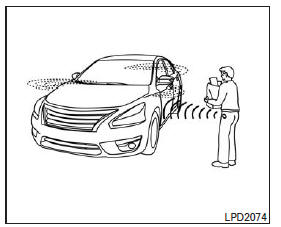
You can lock or unlock the doors without taking the key out of your pocket or bag.
When carrying the Intelligent Key and it is within the proper range, you can lock or unlock all doors by pressing the door handle request switch.
Locking the doors

- Place the selector lever in the P (Park) position, place the ignition switch in the LOCK position, and make sure you have the Intelligent Key in your possession.
- Close all doors.
- Press a door handle request switch 1 while carrying the Intelligent Key.
- All doors and the trunk lock.
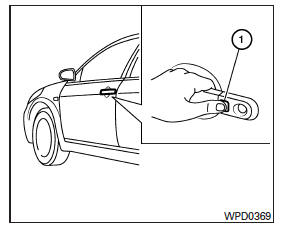
- The hazard warning lights flash twice and the horn sounds twice.
NOTE:
- The request switches for all doors and the liftgate can be deactivated when the Intelligent Key door lock function is set to OFF in the vehicle settings on the multi-function display. Refer to "Multi-function display" in the "Instruments and controls" section.
- The doors lock using the door handle request switch when the ignition switch is not in the LOCK position.
- The doors do not lock if you press the door handle request switch while any door is open. However, the doors lock with the mechanical key even if a door is open.
- The doors do not lock using the door handle request switch when the Intelligent Key is inside the vehicle; a warning beep sounds. However, when an Intelligent Key is inside the vehicle, the doors can be locked with another Intelligent Key.
WARNING
- After locking the doors using the request switch, make sure the doors are locked properly by operating the door handles or the trunk opener switch.
- When locking the doors using the request switch, make sure you have the Intelligent Key in your possession before operating the request switch to avoid leaving the key in the vehicle.
- The request switch works only when the Intelligent Key has been detected by the Intelligent Key system.
Lock Protection
To prevent the Intelligent Key from being accidentally left inside a locked vehicle, the Intelligent Key is equipped with a lock prevention feature.
When the driver's door is open, the doors are locked, the Intelligent Key is inside the vehicle, and then all doors are closed, the doors automatically unlock and the door chime sounds.
NOTE:
The doors may not lock when the Intelligent Key is in the same hand that is operating the request switch to lock the door.
Place the Intelligent Key in your handbag, pocket, or in your other hand.
WARNING
The lock prevention feature may not operate under the following conditions:
- When the Intelligent Key is placed on the instrument panel.
- When the Intelligent Key is placed on the rear shelf.
- When the Intelligent Key is placed in the glove box or in a storage tray.
- When the Intelligent Key is placed in a door pocket.
- When the Intelligent Key is placed on or under the spare tire.
- When the Intelligent Key is placed inside or near metallic materials.
Unlocking the Doors

- Have the Intelligent Key with you.
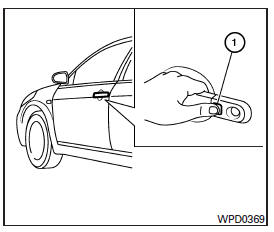
- Press the request switch on the door handle 1.
- The hazard lights flash once and the horn chirps once.
- Press the request switch on the door handle 1 again within five seconds to unlock all doors and the trunk.
If a door handle is pulled while the doors are unlocking, that door may not unlock. Return the door handle to its original position to unlock the door. If the door does not unlock when the door handle returns to its original position, press the door handle request switch to unlock the door.
All doors automatically lock unless one of the following actions occurs within one minute after pressing the request switch:
- A door is opened.
- The ignition switch is pressed.
The interior lamp timer turns on the interior lamp for a set period when a door is unlocked and the interior lamp switch is in the DOOR position.
You can turn off the interior lamp without waiting for the set period by doing one of the following:
- Place the ignition switch in the ON position.
- Lock the doors with the remote keyless entry transmitter.
- Place the interior lamp switch in the OFF position.
Opening the luggage compartment lid
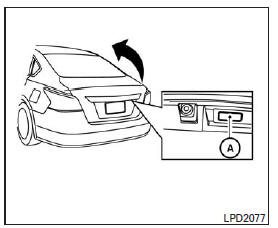
To open the trunk lid, unlock all doors and perform the following steps:
- Press and hold the trunk open request switch A for more than one second while carrying the Intelligent Key.
- The trunk lid unlocks. The chime sounds four times.
- Lift the trunk lid to open the trunk.
Lock Protection
To prevent the Intelligent Key from being accidentally left inside a locked vehicle, the Intelligent Key is equipped with a lock prevention feature.
When all doors are locked, the trunk lid is closed, and the Intelligent Key is inside the vehicle, the horn chirps and the trunk opens.
Test yourself
A quick Nissan Altima quiz: every answer comes with an explanation and a link to the manual page.