Bluetooth® Settings
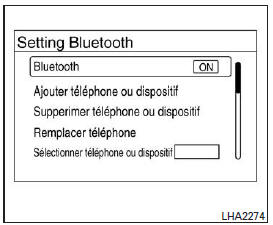
To access the Bluetooth® hands-free phone system settings:
- Press the Settings key.
- Use the TUNE/SCROLL button to select "Bluetooth", then press the ENTER button:
- Bluetooth
Select "On" or "Off" to turn the vehicle's Bluetooth® system on or off.
- Add Phone or Device
To connect a phone to the system, see the "Pairing Procedure" section in this chapter.
- Delete Phone or Device
Select this option to delete a phone from the displayed list. The system will ask for confirmation before deleting the phone.
- Replace Phone
Select this option to replace a phone in the displayed list. After selection, the system will ask for confirmation before proceeding. The stored phonebook of the phone being deleted will be kept as long as the phonebook of the new phone is the same as the phonebook of the old phone.
- Select Phone or Device
Select this option to connect a previously paired phone from the displayed list.
- Phonebook Download
Select this option to turn automatic phonebook download from a connected phone on or off.
- Display Incoming Calls
Select "Driver Only" to display incoming call information on the multi-function display only. Select "Both" to display incoming call information on both the multi-function display and the center display.
- Text Message
Select this option to turn the vehicle's text message function on or off.
- New Text Message Chime
Select this option to adjust the volume of the chime heard when a new text message is received by a phone connected to the Bluetooth® hands-free phone system. Setting it to the far left turns the chime off.
- Display Incoming Text Messages
Select "Driver Only" to display incoming text messages on the multi-function display only. Select "Both" to display incoming text messages on both the multi-function display and the center display. Select "None" to not display incoming text messages.
- Edit Custom Messages
Select this option to set up a custom message with the standard options for sending a text message.
To set up a custom message, send a text message to your own phone number while the phone is connected to the system. Three custom messages can be set up.
Custom messages can only be set up when the vehicle is stopped.
- Auto Reply
Select this option to turn the auto reply function on or off.
When on, the vehicle will automatically send a preset text message to the sender when a text message is received while the vehicle is being driven.
- Auto Reply Message
Select this option to choose the message to send when the auto reply function is on. Select "I'm Driving" or one of the three custom messages stored in the system.
- Vehicle Signature On/Off
Determine whether or not you want the vehicle signature added to outgoing text messages. This message cannot be edited or customized.
Test yourself
A quick Nissan Altima quiz: every answer comes with an explanation and a link to the manual page.